Is it worth A/B testing a slow Shopify store?
Your store is slow. Core Web Vitals are red, mobile LCP sits past four seconds, and you still want to run experiments. The honest question is whether a test on that page tells you anything true, or whether the slowness has already rigged the result before a single visitor converts.
The short answer
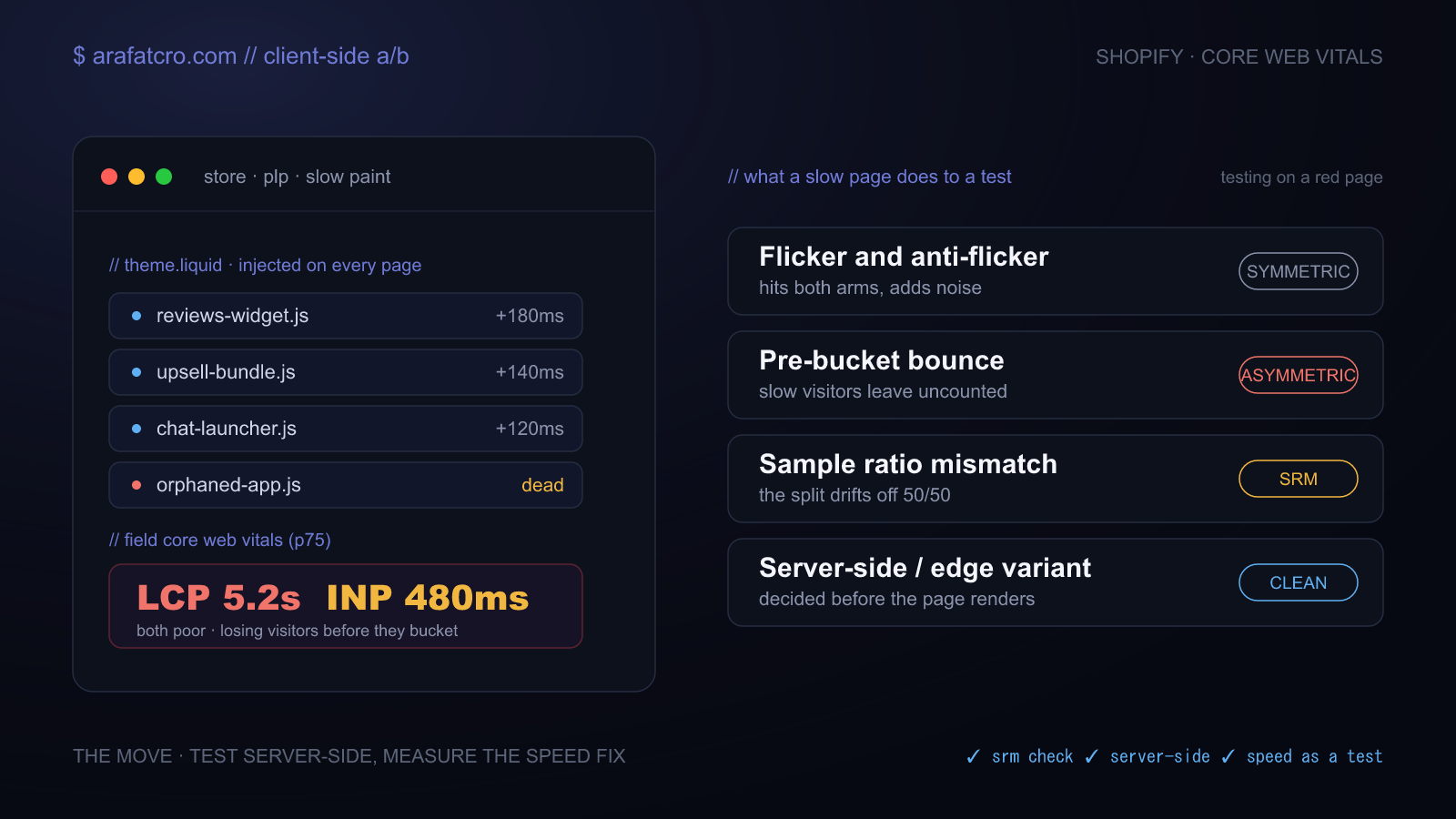
Usually yes, testing is still worth it. Just not by bolting a heavy client-side tool onto an already slow page, and not before you fix the specific speed problems that bias the measurement. A slow store hurts a test from two directions at once. It distorts what you measure, through flicker, anti-flicker delay, and visitors who leave before they are ever counted. And it lowers the ceiling, because the best version of anything you test is still stuck on a page a large share of your mobile visitors abandon before it paints. Fix the parts that bias the result, then test. Often the highest-value test you can run first is the speed fix itself.
Where the bias comes from
A client-side tool loads the original page, then rewrites the DOM in the browser. Between the first paint and the rewrite, the visitor sees the control for a beat. That is the flash of original content. The usual cure is an anti-flicker snippet that hides the whole page until the tool loads, which trades one problem for another: now the largest paint waits behind your test script, so LCP gets worse. Applying the change late instead shoves content around and hurts CLS. On a page that already paints at five seconds, hiding the body on top of that is real harm, to the experience and to the test. There is no free fix on the client.
The good news is that flicker and the anti-flicker delay land on everyone in the test, control and variant alike. They add noise, and they can trigger a novelty reaction, but they do not systematically favour one side. The dangerous problem is the one that lands unevenly.
The bias that actually invalidates the test
On a slow page, some visitors leave before your experiment code runs. They are never bucketed, so they never enter the numbers. That loss is not random. It skews toward slow devices, poor connections, and impatient people. If one variant carries heavier code or errors out for a subset of browsers, it drops those visitors faster than the other, and your two groups quietly stop being comparable. This is sample ratio mismatch, and it is the line between a result that is a little noisy and one you cannot trust at all. Microsoft found it in roughly 6 percent of its experiments, so it is common, not exotic.
Check it on every test. Compare the split you actually got against the split you assigned with a chi-squared test, and treat anything under p 0.01 as a stop sign. You do not adjust for an SRM. You find the cause, then you decide whether the result means anything.
// After the test: is the bucketing the split you assigned?
function srmChiSquare(control, variant, expected = 0.5) {
  const n = control + variant;
  const ec = n * expected;         // expected control count
  const ev = n * (1 - expected);   // expected variant count
  return (control - ec) ** 2 / ec + (variant - ev) ** 2 / ev;
}

// 1 degree of freedom: chi > 6.63 means p < 0.01.
// Stop and find the cause before you read the conversion numbers.
srmChiSquare(10432, 9998); // -> 8.9  → mismatch, do not trust this test
The decision, as a traffic light
Pull field Core Web Vitals from CrUX or Search Console at the 75th percentile, not a Lighthouse lab score on your laptop. Field data is what Google reports and what your real visitors feel. Then read off the action.
| Field vitals (p75) | What it means | What to do |
|---|---|---|
| LCP ≤ 2.5s, INP ≤ 200ms, CLS ≤ 0.1 | The page is not fighting you | Test freely. A light, async client-side tool is fine |
| LCP 2.5 to 4s, or INP 200 to 500ms | The page is shaky | Test, but server-side or edge. Keep the tested element off the LCP path, and skip any whole-page anti-flicker hide |
| LCP > 4s or INP > 500ms | Visitors leave before they bucket | Fix speed first, and run that as your experiment |
Those red lines are practical guidance, not laws of nature. They are the point where the page starts losing enough people pre-bucket that a client-side test tells you more about your JavaScript than about your idea.
Why Shopify is slow, and what a developer fixes
The platform is not the problem. Shopify's CDN and hosting are quick. The weight comes from what gets bolted on top. A typical store runs fifteen to twenty apps, each injecting its own JavaScript, plus a heavy theme, oversized images, and orphaned code from apps that were uninstalled but left their scripts behind in theme.liquid. All that app JavaScript is why INP, the responsiveness metric, is the vital Shopify stores fail most.
The work is unglamorous and it pays. Audit the apps and disable them one at a time while you measure, since a single review or upsell widget can cost hundreds of milliseconds. Strip orphaned scripts left by dead apps. Serve images as WebP and preload the LCP hero rather than lazy-loading it. Defer chat, reviews, and analytics so they stop blocking the main thread. Move an old Debut or Brooklyn theme onto a clean Online Store 2.0 build, where apps can scope their code to the pages that need it.
Ignore the Shopify speed score while you do this. It is a Lighthouse lab benchmark against peer stores, and you can jump it thirty points by removing one app without a single real visitor noticing. Optimise the field vitals your visitors actually experience.
The real move: test server-side, or at the edge
On a slow store, the architecture matters more than the tool. Client-side testing is quick to launch and friendly to non-technical teams, but it adds render-blocking work, causes the flash, needs an anti-flicker hide that costs LCP, and is the most exposed to the attrition that produces sample ratio mismatch. Server-side and edge testing decide the variant before the page renders, so there is no flash and no anti-flicker delay, and the data comes back cleaner. The cost is developer time per test instead of page latency.
For most slow Shopify stores the practical stack looks like this:
- Shopify Rollouts for theme-level tests. It splits traffic server-side at the edge, so zero flicker and no extra script. Know the limits: published themes only, no audience segmentation, and it does not report statistical significance, so you judge that yourself. It also does not apply to Hydrogen, which has no Liquid theme to split.
- Intelligems for price, shipping, and offer tests, the cases Rollouts will not cover.
- An edge layer without going headless. Put a Cloudflare Worker in front of your origin and rewrite the HTML in the response as it streams. That buys flicker-free variants on top of an unchanged store, far less effort than a Hydrogen rebuild and far steadier than DOM manipulation.
- Hybrid bucketing when the visual swap has to stay client-side. Assign the variant at the edge, setting a cookie or header before the page reaches the browser, so visitors are bucketed before they can bounce. That single change removes the pre-bucket attrition behind sample ratio mismatch, even while the change itself still applies in the browser.
| Approach | Variant decided | Flicker | Effort | Best for |
|---|---|---|---|---|
| Client-side tool (VWO, Convert, apps) | In the browser | Yes, needs an anti-flicker hide | Low | Quick tests on already-fast pages |
| Shopify Rollouts | Server, at the edge | None | Low | Theme-level tests, but no significance reporting |
| Intelligems | Server | None | Low to medium | Price, shipping, and offer tests |
| Edge rewrite (Cloudflare Worker) | Edge, in the response | None | Medium | Flicker-free without going headless |
| Hybrid bucketing | Edge assigns, browser swaps | Minor | Medium | Killing SRM while keeping a visual editor |
Speed is a test, not a gate
Do not treat fixing Core Web Vitals as a hurdle you clear before the real testing begins. A speed fix is server-side by nature, so it never flashes the control, and controlled experiments keep showing it moves money rather than just correlating with it. When Microsoft deliberately slowed Bing, the added latency cut revenue per user directly, on the order of half a percent per 100 milliseconds. When Vodafone improved a landing page's field LCP by 31 percent in a clean A/B test with nothing else changed, sales rose 8 percent. The size of the lift on your store is unknown, which is the whole point: ship the speed fix to half your traffic with a holdout and read the result like any other experiment.
I ran into exactly this on a slow Shopify store recently. Variation after variation looked promising in the dashboard, then faded or lost, and it never quite added up. Double-checking the split turned up a sample ratio mismatch, and the vitals underneath it told the real story: CLS was failing in the field and the lab performance score sat in the high 30s. So I paused the tests and put the work into the store itself first. Once the speed is back to a reasonable score, the experiments resume on a foundation that will not quietly bin half the data.
The guardrails
- Run the SRM chi-squared check on every test, before you look at conversions.
- Size the test before launch with a realistic minimum detectable effect. Thin traffic means you can only power big, structural changes, so test those, not a button colour.
- Pick one primary metric up front. Five metrics at the usual threshold gives you better than a one in five chance of a false winner by luck alone.
- Segment every win by device and connection, so a lift that only exists on fast desktops is exposed as survivorship rather than shipped as signal.
Common questions
What is the best way to A/B test a Shopify store?
If the store is slow, test server-side. Shopify's native Rollouts splits traffic at the edge with no flicker, Intelligems handles price and shipping tests, and a Cloudflare Worker can rewrite the HTML at the edge without going headless. Client-side tools are fine once your field Core Web Vitals are green, but on a slow store they add flicker and lose visitors before they bucket. Whatever you use, run a sample ratio mismatch check on every test.
Is it worth A/B testing on a slow Shopify store?
Usually yes, but not by adding a heavy client-side tool to an already slow page, and not before you fix the parts that bias the result. Fix the biasing parts first, then test, and often the highest-value test to run first is the speed fix itself.
Should I fix Core Web Vitals before I start testing?
It depends on how bad the vitals are and where you want to test. If field LCP is over 4 seconds or INP over 500 milliseconds, fix speed first, because the page is losing visitors before they bucket. If vitals are amber, test but do it server-side and keep the tested element off the LCP path. If they are green, test freely.
Does client-side A/B testing slow down Shopify?
It can. The tool rewrites the DOM in the browser, which causes the flash of original content. Hiding the page to stop the flash delays the largest paint and hurts LCP; applying the change late hurts CLS. On a store that already paints slowly, that is the main reason to prefer server-side.
What is sample ratio mismatch, and why does a slow page cause it?
It is when the split you got does not match the split you assigned, say a 50/50 test landing at 52/48. On a slow page, visitors who leave before the experiment code runs are never bucketed, and that loss skews toward slow devices and poor connections. Run a chi-squared test on the split and treat p 0.01 as a stop sign.
Is Shopify Rollouts good enough for A/B testing?
For theme-level tests on a slow store, yes, because it splits server-side with no flicker and no extra script. The catches: published themes only, no audience segmentation, no significance reporting, and no Hydrogen support. For price or shipping tests, reach for Intelligems.
Can I run server-side tests on Shopify without going headless?
Yes. Rollouts is native and server-side. You can also put a Cloudflare Worker in front of your origin and rewrite the HTML in the response, or keep the swap client-side but assign the variant at the edge so visitors bucket before they can bounce.
The short version
A slow store does not mean you cannot test. It means client-side testing is fighting the page, and the honest read of your data depends on visitors who never left. Check for sample ratio mismatch every time, move theme tests server-side or to the edge, and treat the speed fix as your first and best experiment rather than the price of admission.
Sources
- Kohavi, Deng, Frasca, Walker, Xu, Pohlmann. Online Controlled Experiments at Large Scale, KDD 2013. The Bing slowdown experiments that tie latency to revenue.
- Google. Vodafone: a 31% improvement in LCP increased sales by 8%, web.dev case study. The clean landing-page A/B test with LCP as the only variable.
- Fabijan, Gupchup, Gupta, Omhover, Qin, Vermeer, Dmitriev. Diagnosing Sample Ratio Mismatch in Online Controlled Experiments, KDD 2019. The SRM taxonomy and the roughly 6% prevalence figure.
- Google. Web Vitals and INP became a Core Web Vital on 12 March 2024. The LCP, INP, and CLS thresholds used above.
- Google. The business impact of Core Web Vitals, web.dev. A roundup of the conversion lifts behind the speed argument.