Why your A/B test variation won't stick on a React input
You write the variation, set the input's value, and it looks right for a frame. Then React renders and your value is gone. Or it stays on screen but the submit button stays dead, because nothing told React anything changed. Setting the value the normal DOM way does not work on a controlled input, and the reason is worth knowing before you waste an afternoon on it.
The symptom
Your variation sets a field for the user. It prefills a postcode or bumps a quantity. For a moment it is there. Then React renders again from its own state and puts the old value back, so the change flickers and disappears. Or the value holds on screen, but everything that should follow it does not happen. The form stays invalid. The button never enables. The app simply did not notice.
Why React ignores a direct value change
In React an input is a controlled component. React owns its value through state, routes events through its own synthetic system, and keeps a private record of what the input last held. When you set input.value directly you change the DOM node, but you do not touch that private record, so React believes nothing happened. No synthetic onChange fires, and on the next render React writes its own state value straight back over yours. You changed the pixels, not the state, and in React the state always wins.
The fix: set the value the way React expects
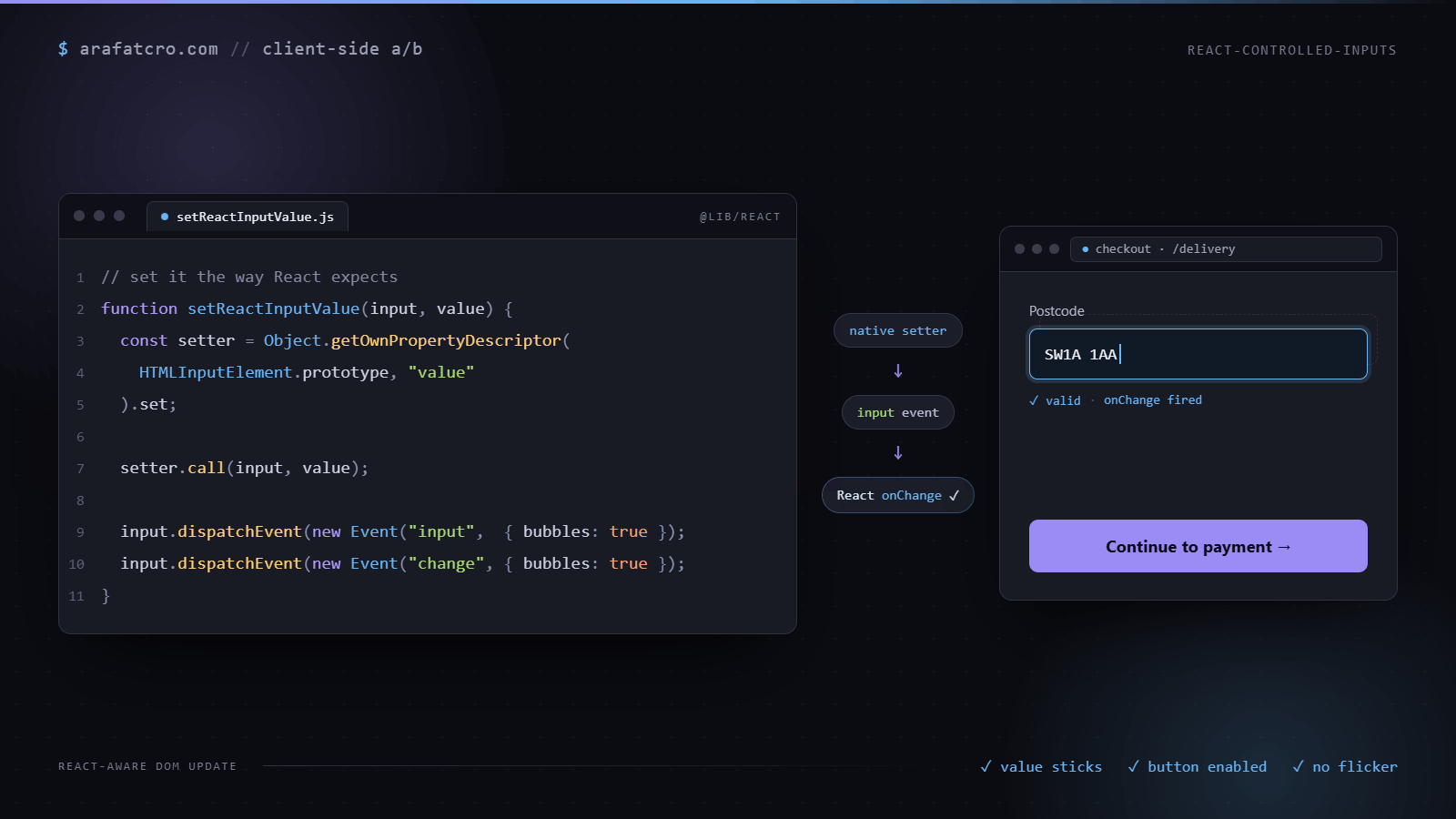
Set the value through the native setter on the element prototype, which updates the record React is watching, then dispatch a real input event that bubbles. Now React sees a genuine change, runs its onChange, and the rest of the app catches up the way it would for a real keystroke. None of this is Optimizely specific. It is the same in VWO, Convert, Adobe Target, or any tool that hands you client side JavaScript.
// Recommended starting point. Swap in what you actually ship.
// Set a React controlled input so React's own tracker updates and onChange fires.
function setReactInputValue(input, value) {
  const nativeSetter = Object.getOwnPropertyDescriptor(
    window.HTMLInputElement.prototype,
    "value"
  ).set;
  nativeSetter.call(input, value);
  // Fire both: some host handlers react to input, others only to change.
  input.dispatchEvent(new Event("input", { bubbles: true }));
  input.dispatchEvent(new Event("change", { bubbles: true }));
}

// A textarea or a select needs its own prototype:
// HTMLTextAreaElement.prototype or HTMLSelectElement.prototype
// Checkboxes and radios track "checked", not "value", so they need their own path.
Checkboxes, radios and selects
These do not follow the text input recipe. For a checkbox or radio, React builds its onChange from the click event, and the value it cares about is checked. The least fragile way to change one is to let the browser do it: if the box is not already in the state you want, call input.click(). A real click toggles checked, fires the events React listens for, and runs any handlers the site hung on the box, the same as a shopper ticking it.
A select is closer to a text input. Use the native setter from HTMLSelectElement.prototype, then dispatch a bubbling change event, which is what React listens to for selects.
// Checkbox or radio: let a real click do the work, so React sees its own event.
function setReactChecked(input, checked) {
  if (input.checked !== checked) input.click();
}

// Select: native setter, then the change event React listens for.
function setReactSelect(select, value) {
  const setter = Object.getOwnPropertyDescriptor(HTMLSelectElement.prototype, "value").set;
  setter.call(select, value);
  select.dispatchEvent(new Event("change", { bubbles: true }));
}
Forms that only validate on blur
Form libraries often validate a field when it loses focus, not when it changes. The value lands, React's state updates, and the error message or the disabled submit button stays exactly where it was, because as far as the form knows the shopper never left the field. After setting the value, move focus in and out: input.focus() then input.blur(). That produces the real focus events React listens for. On mobile, focusing a text field can open the keyboard or scroll the page, so do this before the variation is visible, or only for the fields that need it.
Vue and Angular are more forgiving
This problem is mostly React's. Vue's v-model on a text input and Angular's form controls both read the element's value when an input event arrives, so a plain input.value = x followed by a bubbling input event is usually enough. The native setter does no harm there, so a shared helper can use it everywhere. The part that changes by framework is the event: React checkboxes want a click, Vue and Angular checkboxes generally react to change.
Do not set it before the app is live
On a server rendered React page the HTML arrives first and React attaches afterwards, during hydration. Set a value before that and you are editing HTML React has not claimed yet: hydration may keep it, may overwrite it, or may log a mismatch, depending on the version and the component. Wait until the input is under React's control. A practical check is that React 17 and later put keys starting with __reactProps$ on DOM nodes it manages, so waiting until the input carries one is a reasonable signal the app is live. It is an internal detail, not an API, so treat it as a heuristic and keep a timeout, the same way waiting for a late element works.
Check that it held
Read the value back on the next frame, and check whatever should have reacted to it: the total, the enabled button, the validation message. If React put its own value back, you find out in QA instead of from a result that makes no sense. In production, a quiet event when the check fails tells you how often the variation did not apply, which matters for reading the test.
function confirmValue(input, expected, onFail) {
  requestAnimationFrame(() => {
    requestAnimationFrame(() => {
      if (input.value !== expected) onFail(input.value);
    });
  });
}
Inputs are not the only thing React reclaims
The same ownership bites when you inject elements. Drop a node inside a container React manages and its next render can wipe it out, because that node is not in React's picture of the tree. Mount your own markup into a stable element outside the app root, or be ready to put it back when the view changes. Treat anything inside React's tree as borrowed, not yours.
How this played out on a real build
This came up building a custom quantity stepper on Screwfix. The product pages run on Next.js and the quantity field is React controlled, so adding my own plus and minus buttons hit the usual wall. Setting the value moved the number on screen, but the basket total and the stock check both ignored it, because React never saw a change.
Going through the native value setter and then firing both an input and a change event fixed it. React picked up the new number, and everything that keys off quantity recalculated as if the shopper had typed it. I fired both events on purpose, because some of the host's handlers listened for one and some for the other.
Ways to set a React controlled input
| Approach | Does React's state update? | Reliability |
|---|---|---|
Plain el.value = x | No. You change the DOM node, not React's tracked value, so onChange never fires | Unreliable. React overwrites it on the next render |
el.value = x then dispatch an input event | Sometimes. The event fires, but React compares against its stale tracked value and can skip the update | Flaky. Works on some versions and inputs, fails on others |
Native value setter, then dispatch input | Yes. The setter updates the tracked value and the event makes React read it | Reliable. This is the fix |
Simulating keystrokes (keydown / keypress) | No. Synthetic key events do not change the value, and React ignores untrusted key events for input | Unreliable. Looks plausible, almost never works |
Common questions
Why doesn't my A/B test value stick on a React input?
You set input.value directly, which changes the DOM node but not the private record React keeps of the input's value. React thinks nothing happened, so on its next render it writes its own state value back over yours and the change disappears.
How do I set a React controlled input's value from JavaScript?
Set the value through the native setter on the element prototype, Object.getOwnPropertyDescriptor(window.HTMLInputElement.prototype, 'value').set, called against the input. Then dispatch a bubbling input event so React's synthetic event system runs and state updates.
Why doesn't onChange fire when I set the input value in code?
Setting input.value does not dispatch any event, and React's onChange only runs from its own synthetic event. Dispatch a real input event that bubbles after setting the value, which is what React listens for, so its onChange runs and the app's state catches up.
Do I need the native value setter, or is dispatching an event enough?
You need both. Dispatching an input event without the native setter still leaves React's private value record stale, so React can ignore the change or reset it. The native setter updates that record, and the event tells React to read it.
Does this work for textareas and selects too?
The same idea applies, but each tag has its own prototype. Use HTMLTextAreaElement.prototype for a textarea and HTMLSelectElement.prototype for a select. Checkboxes and radios track checked rather than value, so they need their own setter and a click or change event.
The short version
If a value you set will not stick, or the app ignores it, you are setting it behind React's back. Go through the native setter, fire a real input event so onChange runs, and keep your own markup out of the parts React redraws.