A self-configuring cost-comparison section
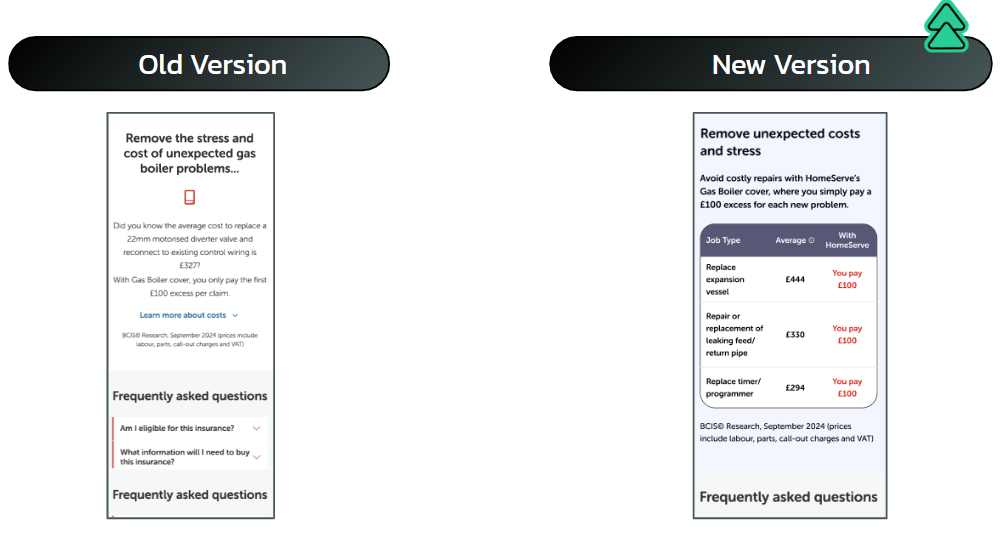
A client-side test that dropped a restyled cost-comparison block onto HomeServe cover PDPs, read its own content live from the DOM, and logged every interaction to GA4. No framework, no hard-coded prices, no double injection. Here is how it was built, from the trigger to the tracking.
I build and QA tests like this for brands and CRO agencies. Start a test brief →
Result
Winning variant. Live 4–20 Feb 2025 across cover PDPs, 27k sessions.
The challenge
Every cover PDP already held the most persuasive thing on the page: a comparison between the small fixed excess a member pays per claim and what the same repair costs at full price. It sat in an accordion, low on the page, where almost nobody scrolled to it.
The task is the one every client-side experiment shares. Add a new section to a page you do not own, using values that already live on that page, and gather enough tracking to prove whether it moved the numbers. Six constraints, one script: no framework, read prices from the live DOM rather than hard-coding them, inject once and only once, gate out legacy browsers, stay operable by keyboard, and measure every view and click exactly once.
The hypothesis
The architecture
The build follows the standard experiment pattern: a triggers file decides when to run, an experiment file orchestrates the work, and everything else is a focused helper or component. Shared config (id, variation, client) drives the lot. The entry point does one job, decide whether and when to run: it rejects Internet Explorer and legacy Edge, waits for the target section to exist, then lets the page settle before anything changes.
import activate from './lib/experiment';
import { pollerLite } from '../../../../lib/uc-lib';

// Skip IE and legacy Edge (12-18): the build relies on modern DOM APIs.
const ieChecks = /MSIE|Trident|Edge\/(12|13|14|15|16|17|18)/.test(navigator.userAgent);

if (!ieChecks) {
  // Wait until the target section exists, then let the page settle.
  pollerLite(['.bcis-cost-wrapper'], () => {
    setTimeout(activate, 2000);
  });
}
The section configures itself
Nothing in the new section is written by hand. Once the variant runs, it reads the cover name with a regex, parses the per-claim excess and the policy text, and collects every job-cost row from the existing markup. Prices are parsed to numbers and sorted so the three most expensive repairs rise to the top, where the contrast with a small fixed excess is starkest.
// Read each job row, parse the £ price, sort most expensive first
const collectAndSortListItems = (elements) =>
  [...elements]
    .map((li) => ({
      name: li.querySelector('.name')?.textContent.trim(),
      price: parseFloat(li.querySelector('.price')?.textContent.trim().replace(/£/, '')),
    }))
    .sort((a, b) => b.price - a.price);
Optional chaining keeps a missing cell from throwing. The component then slices the top three rows and tags the member price so the stylesheet can paint it red against the full repair cost.
const table = (id, lists, perClaimValue) => {
  const priceText = perClaimValue.includes('?') ? perClaimValue.replace('?', '') : perClaimValue;
  return `
    <table aria-label="Job Costs Table">
      <thead>
        <tr>
          <th scope="col">Job Type</th>
          <th scope="col">Average ${tooltip()} ${tooltipContent(id)}</th>
          <th scope="col">With HomeServe</th>
        </tr>
      </thead>
      <tbody>
        ${lists.slice(0, 3).map((item) => `
          <tr>
            <td>${item.name}</td>
            <td>£${item.price}</td>
            <td class="highlight">You pay ${priceText}</td>
          </tr>`).join('')}
      </tbody>
    </table>`;
};
Compose, guard, inject once
Components are plain functions returning template-literal strings. The orchestrator composes the value copy and the table, then drops it in at the top of the wrapper. A single class check makes the whole thing idempotent: if the injected wrapper already exists, the build does nothing, so a re-run or a late poller callback can never stack two sections.
The original buried content is not removed in JavaScript. The stylesheet hides it, which keeps the DOM intact and the change trivial to reverse, one class off and the page is back to control.
// Only inject once: guard against re-runs and late poller callbacks.
if (!document.querySelector(`.${ID}__bcis-cost-wrapper`)) {
  targetElement.insertAdjacentHTML(
    'afterbegin',
    bcisSection(ID, titleName, perClaimValue, policyText, sortedItems)
  );
}
Every view and click, exactly once
The measurement layer is the reason the test could be judged. An events framework sends to GA4, falls back to a private dataLayer pusher when gtag is missing, caches by event id so nothing fires twice, and suppresses everything while the QA flag is on so test traffic never reaches the data. Three IntersectionObservers record the section being seen and the Apply CTA coming into view; click delegation covers the tooltip and the "learn more" accordion.
// Two paths to the same event, so tracking survives pages that never loaded gtag
send(label) {
  pollerLite([() => document.readyState === 'complete'], () => {
    if (window.gtag !== undefined) {
      window.gtag('event', 'experimentation', {
        experiment_id: `${ID}-${VARIATION}`,
        action: label,
        send_to: this.property, // the client's GA4 property, from shared config
      });
    } else {
      // No gtag on the page? Fall back to a private dataLayer pusher.
      window.dataLayer = window.dataLayer || [];
      window.customGtag = window.customGtag || function () { window.dataLayer.push(arguments); };
      window.customGtag('event', 'experimentation', {
        experiment_id: `${ID}-${VARIATION}`,
        action: label,
        send_to: this.property,
      });
    }
  });
}
Each view event is then gated by a body class, so a repeating observer callback becomes a one-time event, and a second sendOnce cache de-dupes click and interaction events. The result: control and variant separate cleanly in reporting, and no metric is inflated by a double count.
const handleIntersectionBcisContent = (entry) => {
  if (entry.isIntersecting && !document.body.classList.contains(`${ID}__bcisContent`)) {
    fireEvent('User sees the BCIS content'); // body class guarantees this fires once
    document.body.classList.add(`${ID}__bcisContent`);
  }
};
Operable by keyboard
The tooltip that explains where the average costs come from is not mouse-only. The trigger carries a role, a tabindex and an aria-label, and dedicated keydown handlers let users open it with Enter or Space and close it with Escape, on both the popup and its close icon. Control and variant share exactly the same tracking; the only difference between them is the DOM, because control returns before any of the injection runs. That keeps the comparison honest.
tooltipWrapper.addEventListener('keydown', (e) => {
  const wrapper = e.target.closest('th');
  if (e.key === 'Enter' || e.key === ' ') {
    e.preventDefault();
    wrapper.classList.toggle('open'); // open or close the tooltip
  } else if (e.key === 'Escape') {
    wrapper.classList.remove('open'); // Escape always closes
  }
});
What I would harden next
The build did its job for a 17-day test. A few things are worth tightening before code like this earns a permanent place on the site, and naming them is part of the handover.
- Loosen the coupling to client markup. The build leans on selectors like
.bcis-cost-wrapper,.nameand.price. A required-nodes check that aborts cleanly, plus a tracked "failed to build" event, would make a template change on the client side visible instead of a silent no-show. - Replace the fixed two-second wait. A hard
setTimeoutraces slow pages and wastes time on fast ones. Polling for the specific child nodes the build actually reads would fire as soon as the data is ready, no sooner and no later. - Unify the two sub-head paths. The reader branches on whether the sub-head wrapper contains child divs, which points at two live template variants. Documenting or unifying that removes a quiet source of surprise for the next person.
- Move config out of code and add teardown. The GA4 property belongs in shared config for reuse, and the observers are never disconnected, harmless here but worth a teardown on anything longer-lived.
Shipped spec
- Pages: Plumbing, Heating, Electrics and Landlord cover PDPs
- Devices: desktop and mobile
- Live: 4 to 20 February 2025 (17 days)
- Sessions: 12,563 control, 14,441 variant
The variant beat control on conversion at 99% significance and on checkout starts at 100%, with purchase revenue up more than half. It earned its place on the page.