Getting a private-label sample into high-intent baskets
The interesting part of this test was never the popup itself. Anyone can float a box over a page. The work was making it add a product to a Magento cart the way the store's own buttons do, know when to stay out of the way, and hand the customer off to a Klaviyo flow, all from inside a VWO campaign without touching the codebase.
I build and QA tests like this for brands and CRO agencies. Start a test brief →
The opportunity
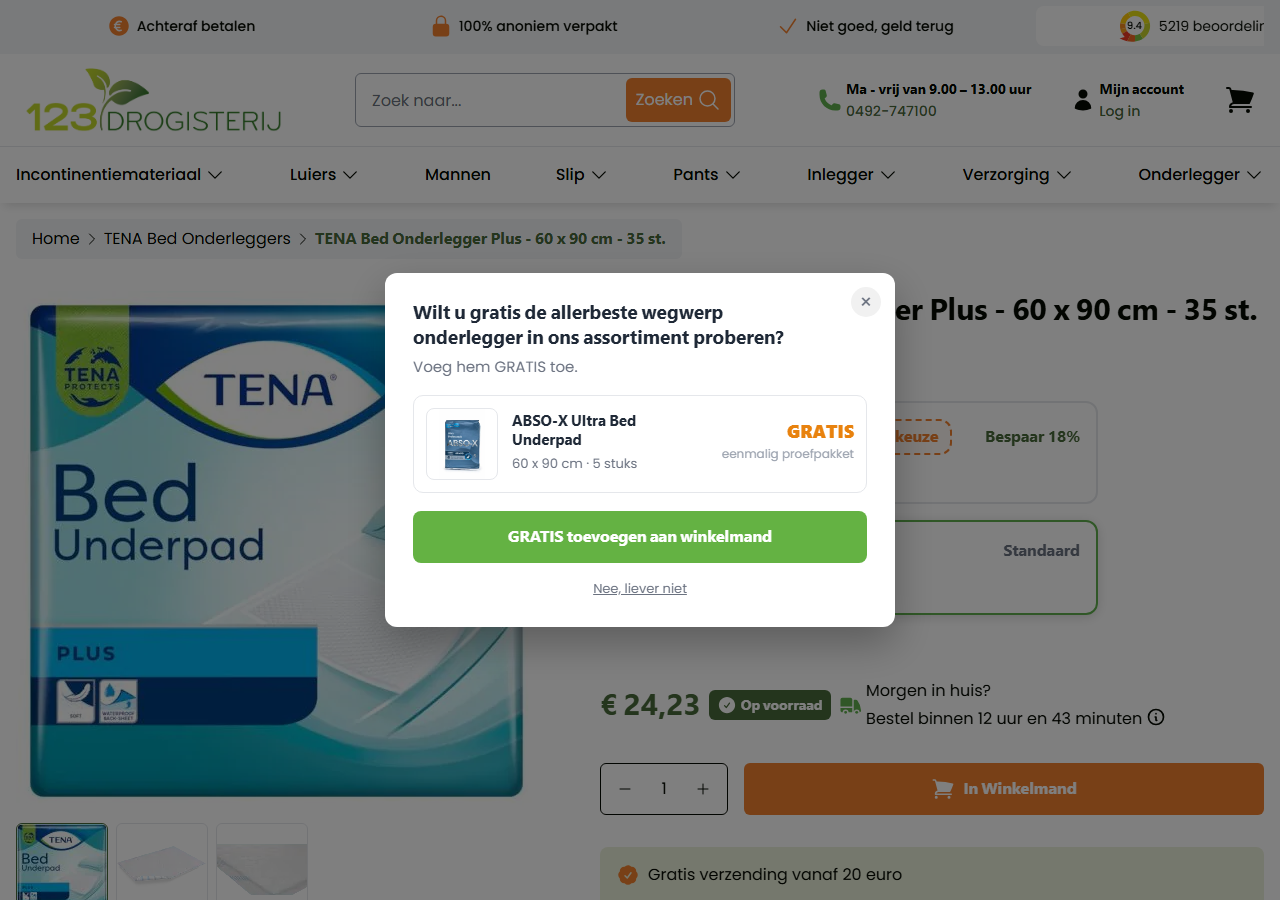
123drogisterij stocks the incontinence brands people already know, TENA chief among them, and it sells its own private label, ABSO-X. The own label makes more margin, but shoppers reach for the name they recognise. Someone sitting on a TENA bed-underpad page is about as in-market as this category gets, and most of them have never tried the ABSO-X version of the same thing. The barrier to switching to a private label is rarely price. It is trust, and the cheapest way to earn trust is to put the product in someone's hands.
So the question was narrow and testable. If we offer a free ABSO-X sample to people already looking at a bed underpad, do enough of them take it, and does taking it lead anywhere worth the effort later.
The hypothesis
We call it a win if the free-sample add rate on the target pages hits target, product-page conversion and revenue per visitor hold steady (the guardrail that matters most), and over the following weeks we see a lift in ABSO-X repeat purchase and Klaviyo flow entries. The test runs against visitors to ten specific SKUs on the Dutch storefront, with a category-level trigger held in reserve for when that list grows.
What I built
The brief looked like a popup job. It was really a Magento integration job wearing a popup.
Targeting on the real SKU, not a guess at the URL
Rather than pattern-matching page addresses, the script reads the product's SKU straight from the Product JSON-LD that Magento renders into every product page, and falls back to the "Artikelnummer" row in the spec table if it needs to. So the popup fires on exactly the ten SKUs it should and nowhere else, and it keeps working if a URL or a template changes underneath it.
Adding to cart the way the store does
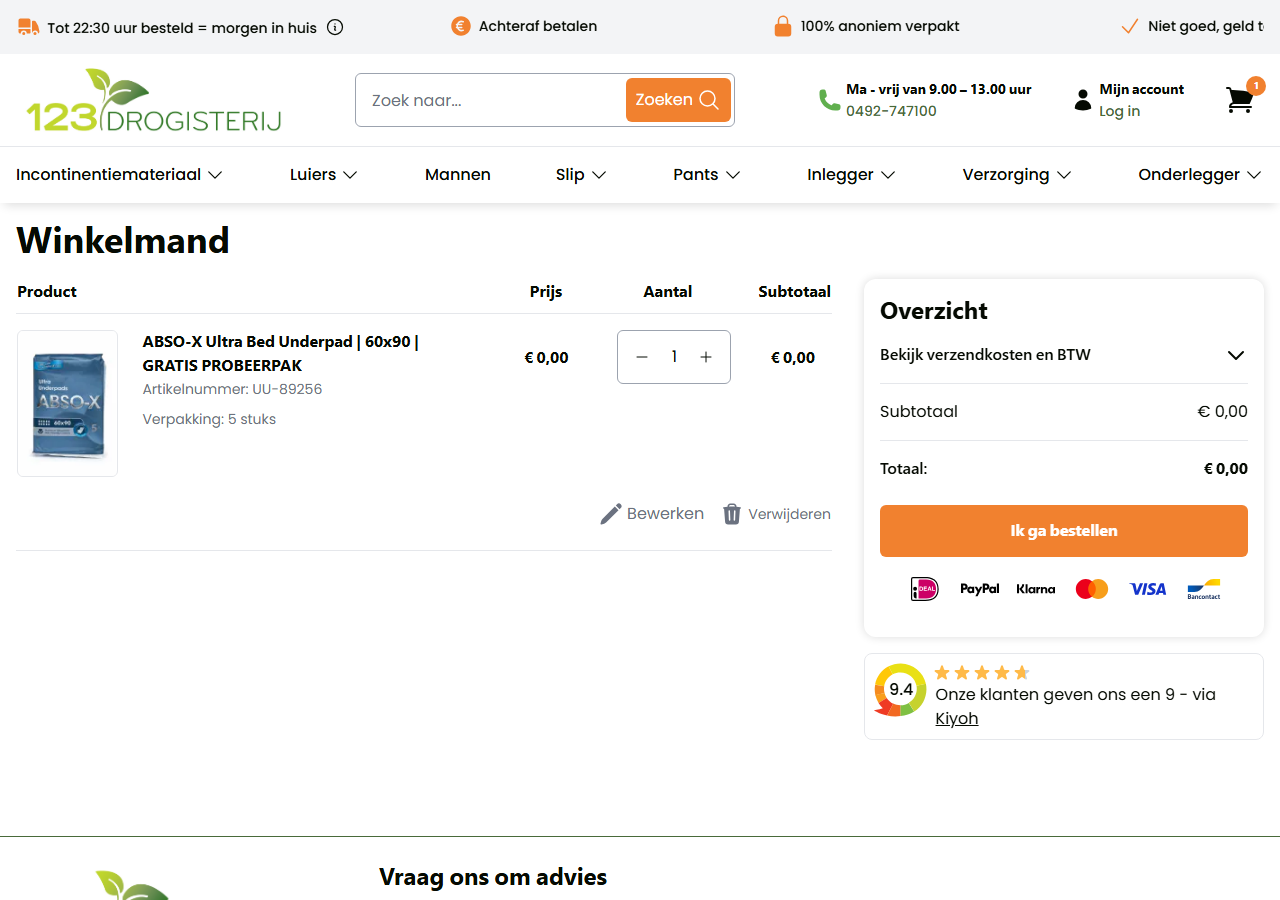
The easy version of this posts to some invented endpoint and hopes. It also tends to fail, because adding an item to a Magento cart is not a tidy JSON API. It is a form submission to the checkout/cart/add controller, and that controller wants three things a casual script usually gets wrong. It wants the numeric product ID, not the SKU (2170, not UU-89256). It wants Magento's form_key, the per-session CSRF token, or it rejects the request out of hand. And it wants a uenc, the base64-encoded return URL Magento uses to decide where to send the shopper after the add.
On a Hyvä storefront those last two are available in the browser, so at click time the script reads hyva.getFormKey() and hyva.getUenc(), builds a URL-encoded body of product, qty, form_key and uenc, and posts it to /checkout/cart/add with the X-Requested-With: XMLHttpRequest header and credentials: 'include' so the request carries the session cookie and Magento treats it as an ajax add rather than a full-page submit.
Then comes the part that separates a native-feeling add from a broken one. Magento keeps the header and mini-cart in sync through what it calls customer sections, and changing the cart on the server does nothing to the visible mini-cart until you tell the front end to reload those sections. Hyvä does that by dispatching a reload-customer-section-data event on the window, so the script fires the same event straight after a successful add. The mini-cart count and contents update on the spot, exactly as if the shopper had clicked a real add-to-cart button, and only then does it send them through to the basket. Skip that event and the item really is in the cart, but the page looks like nothing happened, which reads as broken.
Because the whole flow borrows the store's own endpoint, session token and refresh event, it inherits the store's rules and stays consistent with everything else on the site. A guessed endpoint would either bounce off the form_key check or leave the mini-cart out of sync. There is also a guard that refuses to post without a real product ID and surfaces an error state on any failure rather than doing nothing quietly, which is how the missing product ID showed up during QA instead of failing in silence.
Stripped to its essentials, the call looks like this.
async addSampleToCart() {
  const { productId } = this.config.freeSample; // 2170, the numeric ID, not the SKU
  // Magento's per-session CSRF token and return URL, straight from Hyvä.
  const formKey =
    window.hyva?.getFormKey?.() ||
    document.querySelector('input[name="form_key"]')?.value ||
    '';
  const body = new URLSearchParams();
  body.set('product', productId);
  body.set('qty', '1');
  if (formKey) body.set('form_key', formKey);
  if (window.hyva?.getUenc) body.set('uenc', window.hyva.getUenc());
  // Post it the same way the storefront's own add-to-cart button does.
  const response = await fetch('/checkout/cart/add', {
    method: 'POST',
    credentials: 'include', // send the session cookie
    headers: {
      'Content-Type': 'application/x-www-form-urlencoded;charset=UTF-8',
      'X-Requested-With': 'XMLHttpRequest', // treat as an ajax add, not a page submit
    },
    body: body.toString(),
  });
  if (!response.ok) throw new Error(`Add to cart failed: ${response.status}`);
  // The part that makes it feel native: refresh the customer sections so the
  // mini-cart updates on the spot, exactly like a real add-to-cart click.
  window.dispatchEvent(new CustomEvent('reload-customer-section-data'));
  return response;
}
Knowing when to stay quiet
Nagging someone to add a sample they already have is a fast way to annoy a customer, so the popup had to know what was in the basket before it showed. The clean way to read a Magento cart from the browser, with no server round trip, is to read the same cache the mini-cart reads from. Magento keeps its customer-section data in localStorage under the key mage-cache-storage, a JSON blob whose cart section holds the totals, a summary count, and an items array where each line carries both product_id and product_sku.
So before rendering anything, the script reads that key, walks cart.items, and checks whether any line's product ID is 2170 or SKU is UU-89256. A match means the sample is already in the basket and the popup never renders. Matching on both fields rather than one covers themes that populate the ID but not the SKU, or the other way round. The read is best-effort and it fails open on purpose: if the key is missing, unparseable, or shaped differently than expected, the function returns false and the shopper still sees the popup. Occasionally showing it to someone who already has the sample is a much smaller problem than wrongly hiding it from everyone if Magento ever changes the cache format.
The one honest limitation is staleness. The cache reflects the last time Magento refreshed its sections, so in an edge case like a cart changed in another tab and not yet synced, it can lag reality by a moment, which is a fine trade for a promotional popup. If it needed to be authoritative I would swap the localStorage read for a live GET /customer/section/load/?sections=cart during the popup's existing delay, at the cost of one request. There is a useful knock-on effect too. Because the add-to-cart flow drops the sample into the basket, this same check stops the popup reappearing on later visits once a shopper has accepted the offer.
The check itself is short.
_isSampleInCart() {
  const { productId, sku } = this.config.freeSample;
  try {
    // The same client-side cart cache the mini-cart reads from.
    const raw = window.localStorage.getItem('mage-cache-storage');
    if (!raw) return false;
    const items = JSON.parse(raw)?.cart?.items;
    if (!Array.isArray(items)) return false;
    // Match on product ID or SKU; different themes populate one or the other.
    return items.some((item) =>
      String(item?.product_id) === String(productId) ||
      (sku && String(item?.product_sku) === String(sku))
    );
  } catch (err) {
    return false; // fail open: if the cache is unreadable, still show the popup
  }
}
Feeding the CRM
On a successful add it fires a Klaviyo track event through the store's existing _learnq integration, the same interface the site's own "Viewed Product" tracking already uses. The client's team can trigger a trial-to-purchase flow off that event with no extra plumbing on the site.
Making it safe to put on a live store
A test that breaks the page it runs on is worse than no test.
The store enforces a Content Security Policy, which caught an early mistake: the first sample image was hosted off-domain and the browser refused to load it. Swapping to an image served from the client's own catalogue put it back inside the site's img-src rule, where it belongs. Everything the script does stays same-origin for the same reason.
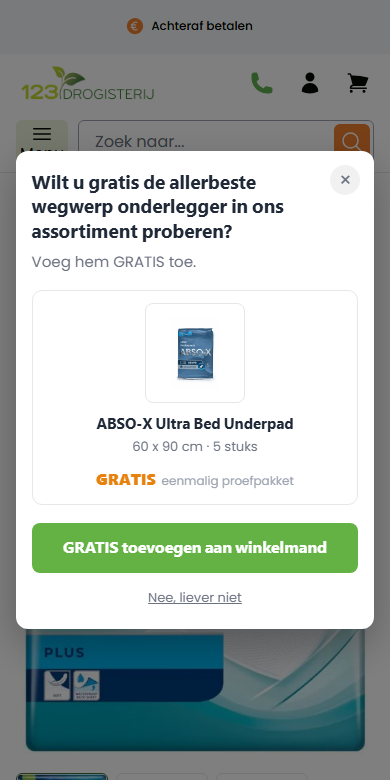
The code is wrapped so nothing leaks into the global scope, and it leaves the product page's own scripts alone. On the accessibility side, focus moves into the dialog when it opens and returns to where the shopper was when it closes, Tab is trapped inside the popup while it is open, Escape shuts it, and it respects a reduced-motion preference. It reflows cleanly down to small mobile widths.
Setup and QA
The experiment ships through VWO's custom code, so there was no release cycle to wait on. VWO can inject a script before or after the page has finished loading, so the bootstrapping copes with both and runs either way. For QA I built in a preview switch (?fsp-preview on the URL) that forces the popup onto any page, which let me check the design and behaviour without depending on the live SKU targeting.
Success metrics
Primary: free-sample add rate on the ten target PDPs. Guardrail: product-page conversion and revenue per visitor hold steady, because the popup must not eat into the primary sale. Downstream: ABSO-X repeat purchase and Klaviyo flow entries over the following weeks.
Post-test analysis
Built and in QA. Live numbers to follow once the test has run.
Where it goes next
If it wins, the mechanic is the obvious next thing to test: adding the sample straight to the basket, as here, against simply linking through to the sample's product page and letting the shopper add it themselves. Copy and trigger timing are worth a look too. And because the targeting already supports a category-level trigger, widening it from ten SKUs to the whole bed-underpad category is a small change rather than a rebuild.