Trade-price prominence — account-creation lift
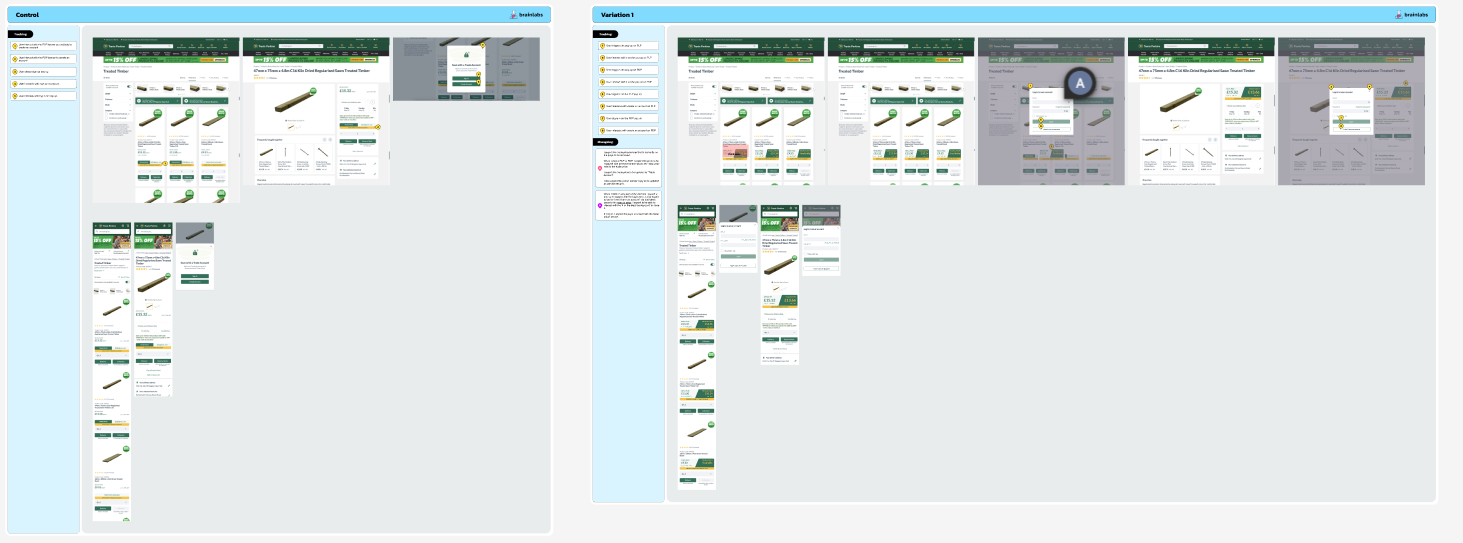
A two-state PLP and PDP test on a builders' merchant site: replace the host's separate trade-price block with a unified price banner showing retail and trade side-by-side, gated to logged-out users only, with a click opening the host's own login form embedded in a modal alongside a "create an account" CTA.
The problem
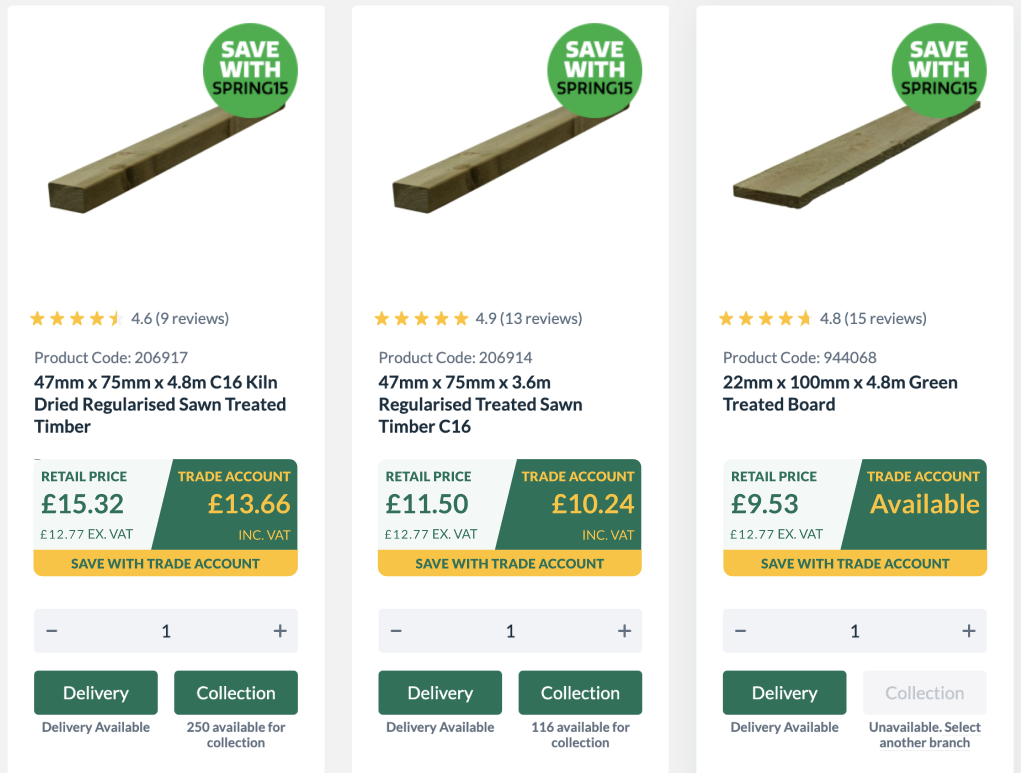
Trade pricing on the host's PLPs and PDPs lived in a separate block beneath the retail price. The visual hierarchy made it easy for a logged-out user to skim past the trade price entirely, which weakened the incentive to create a trade account — the conversion event that mattered most for this user segment.
Earlier attempts had increased trade-account creation through promotion of the cheaper price, but in the current journey the prices were physically separated on the page. Comparing the two required visual effort, and the site wasn't doing the work for the user.
The hypothesis
We believe that making the messaging for trade price as prominent as the retail price for all users not signed in to an account will result in increased trade account creations. This is due to the price being more easily comparable as it is in the same size and in the same location as the retail price.
The solution
Variation 1 makes three coordinated changes for logged-out users on PLPs and PDPs:
- Unified price banner — a single component shows retail and trade pricing side-by-side at equal visual weight. The host's existing separate trade-price block is hidden.
- Banner click opens a login modal — embedded with the host's own login form via
window.TP.renderLoginForm, alongside a "create an account" link to the signup page. - Logged-in users see no change — a cookie check skips the experiment for authenticated users entirely, since the trade price is already their default.
The banner is added to every product card on the PLP grid and once on each PDP, with a duplicate-render guard to handle pagination clicks and SPA route changes cleanly.
Implementation
Three patterns shaped the build: cookie-based authentication gating to ensure the experiment runs only for the relevant audience, surgical DOM editing of the host's existing price elements (clone, modify, hide originals — preserve all the host's bound behaviour), and integration with the host's identity SDK so the embedded login form behaves identically to the native one.
// Folder structure
TP283/
  src/
    lib/
      components/
        priceBanner.js
      helpers/
        utils.js
    experiment.js
    _variables.scss
    experiment.scss
    triggers.js
Authentication gating via cookie check
The host stores an access_token cookie when a user is signed in. The experiment reads it
on init — if present, the variant is skipped entirely and the experiment classes are removed from
<html>. This keeps logged-in users on their existing experience (where trade
pricing is already default) and ensures the analytics segment matches the test population the brief
intended.
const isLoggedIn = () => !!getCookie('access_token');
const isPlp = () => window.location.href.includes('/c/');
const isPdp = () => window.location.href.includes('/p/');

const init = () => {
  // Skip experiment entirely for logged-in users or off-target pages
  if ((!isPlp() && !isPdp()) || isLoggedIn()) {
    document.documentElement.classList.remove(`${ID}`);
    document.documentElement.classList.remove(`${ID}-${VARIATION}`);
    return;
  }
  // ...continue with experiment setup
};
Clone-and-replace pattern for price elements
Rather than re-rendering the price section from scratch (and risking loss of the host's bound event
handlers, accessibility attributes, and any other behaviour attached to the elements), the
experiment clones the existing retail-price element, adds a class for trade-price styling, and slots
both the clone and a new price banner around the originals. The originals are hidden with
display: none rather than removed — keeps the host's React tree intact, avoids
reconciliation glitches.
// PDP — clone retail price, build banner, hide originals, slot in
const normalPriceElement = document.querySelector(
  '[data-test-id="best-price"] > div:first-child'
);
const tradePriceElement = document.querySelector(
  '[data-test-id="trade-price-value"]'
);

// Clone the retail price node — keeps DOM structure consistent
const normalPriceClone = normalPriceElement.cloneNode(true);
normalPriceClone.classList.add(`${ID}__trade-price`);

const tradePrice = tradePriceElement?.textContent ?? 'Available';
const vatTextElem = tradePriceElement?.parentElement.querySelector(
  '[class*="TradePriceBox__BadgeTextCustom"]'
);
const vatText = vatTextElem?.textContent ?? '';

// Build the unified banner
const banner = priceBanner(ID, tradePrice, vatText);

// Hide the host's separate trade-price block
const attachPoint = document.querySelector(
  '[data-test-id="trade-price-discount-block"]'
);
attachPoint.style.display = 'none';

// Insert banner, hide original retail price, mount clone inside banner
normalPriceElement.insertAdjacentHTML('afterend', banner);
normalPriceElement.style.display = 'none';

const bannerElement = document.querySelector(`.${ID}__prices-banner`);
bannerElement.insertAdjacentElement('afterbegin', normalPriceClone);
bannerElement.nextElementSibling.style.display = 'none';
PLP grid — same pattern, applied per-card
On PLPs, the same logic runs once per product card. A per-card duplicate-render guard prevents the banner from being injected twice when pagination loads new cards. The banner attaches before the existing trade-price element on each card, then hides the originals.
if (isPlp()) {
  const prodCards = document.querySelectorAll('[data-test-id="product"]');

  prodCards.forEach((card) => {
    // Per-card guard against duplicate render on pagination
    if (card.querySelector(`.${ID}__prices-banner`)) return;

    const normalPriceElement = card.querySelector(
      '[data-test-id="best-price"] > div:first-child'
    );
    const tradePriceElement = card.querySelector(
      '[data-test-id="trade-price-value"]'
    );

    const normalPriceClone = normalPriceElement.cloneNode(true);
    normalPriceClone.classList.add(`${ID}__trade-price`);

    const tradePrice = tradePriceElement?.textContent ?? 'Available';
    const banner = priceBanner(ID, tradePrice, vatText);

    const attachPoint = card.querySelector(
      '[data-test-id="product-card-trade-price"]'
    );
    attachPoint.insertAdjacentHTML('beforebegin', banner);

    // Hide originals — same pattern as PDP
    normalPriceElement.style.display = 'none';
    const bannerElement = card.querySelector(`.${ID}__prices-banner`);
    bannerElement.insertAdjacentElement('afterbegin', normalPriceClone);
    bannerElement.nextElementSibling.style.display = 'none';
  });
}
Embedded login via the host's own identity SDK
The login modal doesn't ship its own form — instead, it calls window.TP.renderLoginForm,
the host's existing identity component. This means the embedded form behaves identically to the
site's native login: same validation, same SSO hooks, same error states, same post-login redirect
handling. The experiment owns the modal chrome (overlay, close button, "create an account" CTA) but
leaves authentication logic entirely to the host.
// Build modal shell — overlay + container + close + login slot
const modal = document.createElement('div');
modal.id = `${ID}__modal`;
modal.classList.add(`${ID}__hidden`);

modal.innerHTML = `
  <div id="${ID}__overlay" class="${ID}__overlay"></div>
  <div id="${ID}__modalinner" class="${ID}__modalinner">
    <div class="${ID}__formclose"><!-- close icon --></div>
    <div id="${ID}__loginform" class="${ID}__loginform"></div>
    <a href="/content/create-account" class="${ID}__signupbtn">
      I don't have an account
    </a>
  </div>
`;

// Mount and hand over to host's identity SDK
if (!document.getElementById(`${ID}__modal`)) {
  document.body.appendChild(modal);

  if (window.TP && typeof window.TP.renderLoginForm === 'function') {
    window.TP.renderLoginForm(`${ID}__loginform`);
  }
}
Page-aware event tracking
Every modal interaction fires events with the page context appended (PDP, PLP, or Other). That gives analysts a single event family with consistent labelling, while preserving the per-page breakdown they need for the secondary metrics: pop-up triggers, dismissals, sign-ins, and account-creation clicks all tagged by where they happened.
document.body.addEventListener('click', (e) => {
  const { target } = e;
  const pageType = isPdp() ? 'PDP' : isPlp() ? 'PLP' : 'Other';

  if (target.closest(`.${ID}__prices-banner`)) {
    document.getElementById(`${ID}__modal`).classList.remove(`${ID}__hidden`);
    fireEvent(`User triggers the pop up on ${pageType}`);
  }
  else if (target.closest(`.${ID}__formclose`) || target.closest(`.${ID}__overlay`)) {
    document.getElementById(`${ID}__modal`).classList.add(`${ID}__hidden`);
    const dismissMethod = target.closest(`.${ID}__formclose`) ? 'X' : 'overlay';
    fireEvent(`User closes popup with ${dismissMethod} on ${pageType}`);
  }
  else if (target.closest(`.${ID}__signupbtn`)) {
    fireEvent(`User interacts with create an account on ${pageType}`);
  }
});
SPA-aware re-init for paginated PLPs
The host's PLP pagination doesn't trigger a full page load — it re-renders the product grid in place.
The experiment listens for clicks on the host's pagination button
([data-test-id="pag-button"]), then re-runs init after a delay so the new product cards
have time to render. The same delay handles SPA route changes more broadly via
onUrlChange.
// Re-init on pagination click — host re-renders cards in place
document.body.addEventListener('click', (e) => {
  if (e.target.closest('[data-test-id="pag-button"]')) {
    setTimeout(init, DOM_RENDER_DELAY);
  }
});

// SPA route change — wait for host to settle, then re-init
onUrlChange(() => {
  pollerLite(['#app-container'], () => {
    setTimeout(init, DOM_RENDER_DELAY);
  });
});
Acceptance criteria
- Test runs on desktop, tablet, and mobile
- Targets PDP and PLP pages only
- One variation against control
- Excluded audience: users signed in to an account (cookie-based check)
- Trade price banner replaces the host's separate trade-price block
- Retail and trade prices appear at equal visual weight, side-by-side
- Yellow "Save with a Trade account" badge appears beneath the banner
- Banner click opens a modal with embedded login form (via host SDK) plus signup link
- Modal closes on X click, overlay click, and post-login navigation
- Recommended runtime: 30 days
Success metrics
Primary metric: trade account creations. Secondary: add-to-bag rate, conversion rate, AOV, items per order, pages viewed in journey, PLP views, PDP views, bag views, checkout progression. Stakeholder questions to investigate post-test: where in the journey do users most likely create a trade account, how does the test impact that, are users adding to bag before creating an account, are users abandoning bag without account creation (suggesting confusion), and on the variant — are users opening the pop-up by mistake and going back, or are they engaging genuinely.
Strategic context
The previous account-creation test had succeeded by promoting the cheaper price, but the journey context was different — prices were already physically separated on the page in the current build, making comparison hard. This test isolates the impact of visual prominence and proximity from the impact of price-cut messaging itself. A win here validates the design hypothesis that comparable prices need to be physically comparable, not just numerically present.
Post-test analysis
Results pending. This section will be updated with anonymised outcome highlights once the analysis is published and approved for share.