"Shop Similar" follow-me carousel
A two-variant test injecting a sticky similar-products carousel onto PDPs for Google Shopping landers, with breadcrumb-derived API fetching, sessionStorage caching, and a "follow-me" mechanic that persists the carousel as users navigate within the same category.
The problem
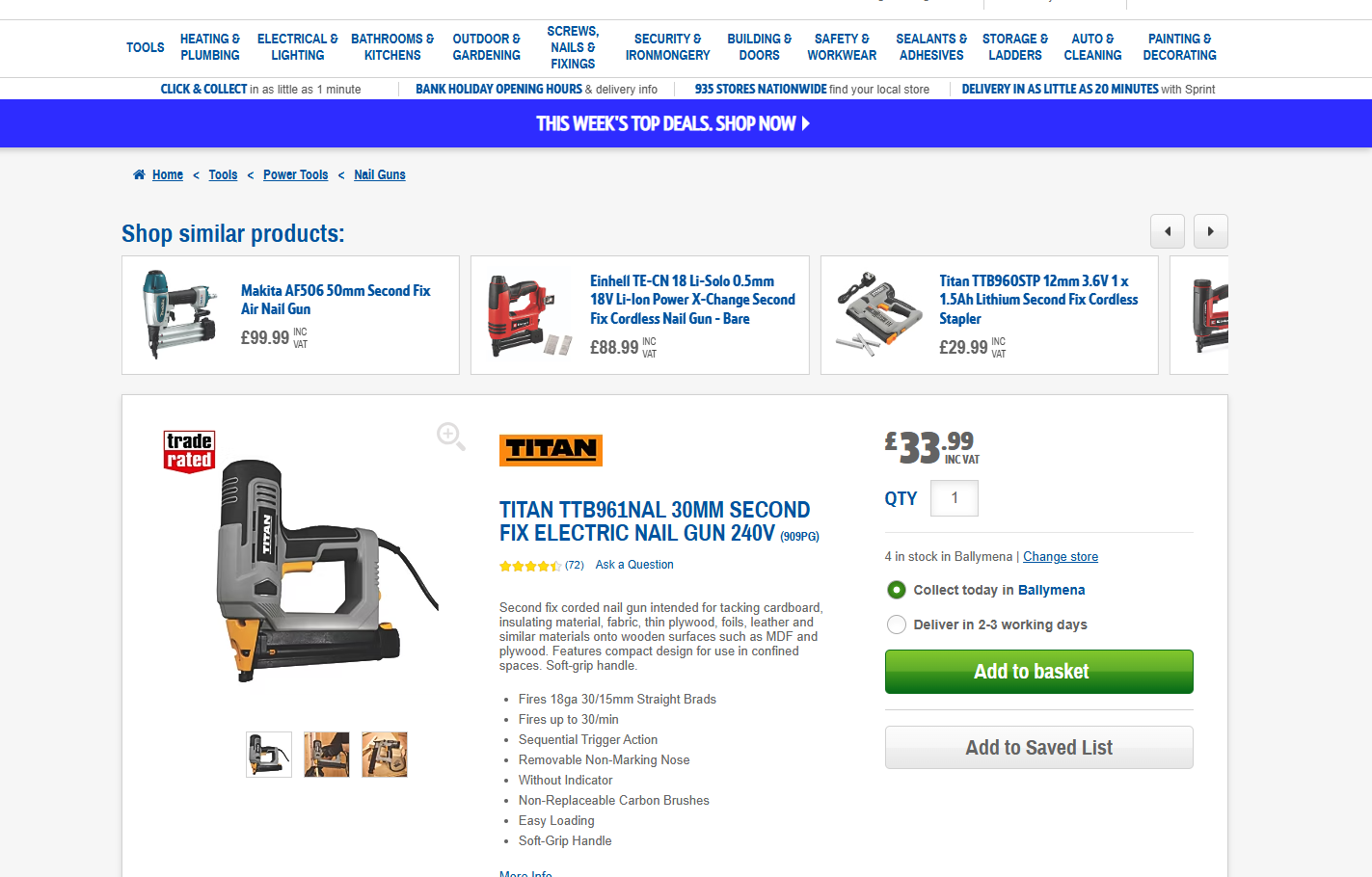
Google Shopping landers arriving on PDPs for the top-50 power-tool SKUs were exhibiting a known pattern: when the specific product wasn't quite right, users were exiting and re-entering the site through Google Shopping multiple times rather than browsing alternatives on-site. The hypothesis was that giving these users immediate access to similar products from the same category — without forcing them through the existing PLP flow — would reduce exit rate and lift add-to-bag rate.
The hypothesis
We believe that adding a similar-products carousel to the PDP for Google Shopping landers will result in a decrease in exit rate from these users and an increase in add-to-basket rate. This is due to users having alternative products to browse, removing the need to exit and re-enter through Google Shopping.
The solution
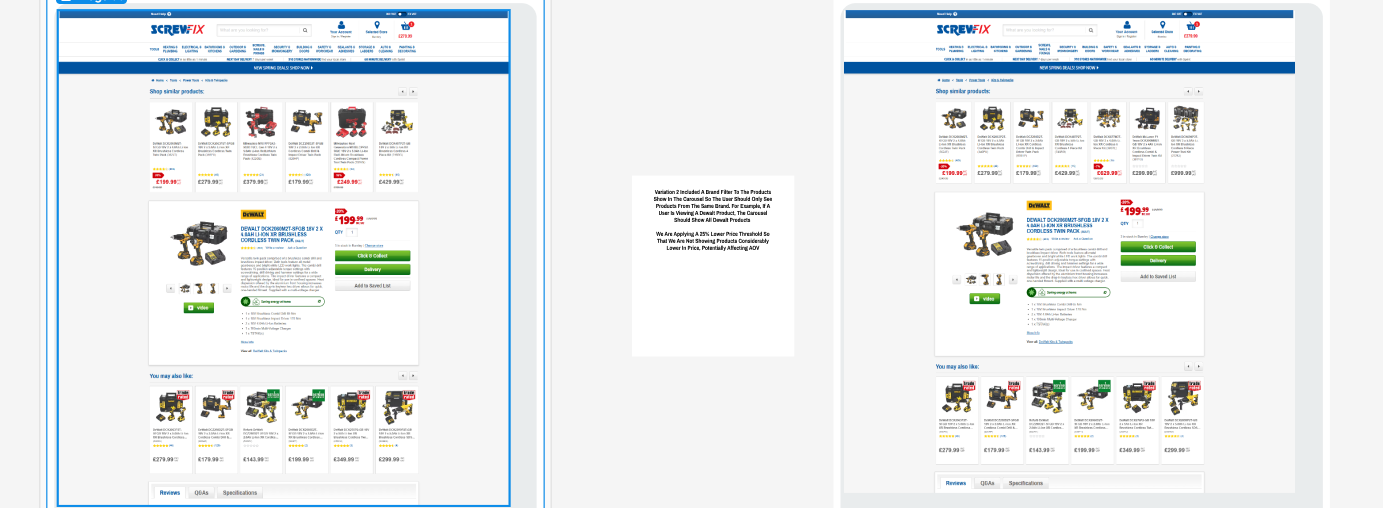
Variation 1 — Carousel, no brand filter. A "Shop Similar Products" carousel renders above the PDP for users landing from Google Shopping on a top-50 SKU. Products come from the same category as the viewed product (derived from the last breadcrumb), with a 25% lower price threshold and +£100 upper price ceiling to protect AOV.
Variation 2 — Carousel with brand filter. Same as V1, but adds a brand filter on the underlying PLP fetch — testing whether brand-loyal users convert better when shown only same-brand alternatives.
Both variants implement a "follow-me" behaviour: once a user clicks a product in the carousel, the carousel persists across subsequent PDPs in the same category, allowing continuous browsing of suggestions without re-fetching.
Implementation
Built as an Optimizely Web IIFE on a Next.js SPA. The technically interesting parts were the data-fetching strategy and the cache-driven follow-me mechanic — both designed to render fast, avoid redundant network calls, and stay accurate as the user navigates.
// Folder structure
SCR289/
  src/
    lib/
      components/
        product.js
        sliderWrapper.js
      data/
        data.js               // top-50 SKU list
      helpers/
        initSwiper.js
        swiper.js
        utils.js
    experiment.js
    _swiper.scss
    _variables.scss
    experiment.scss
    triggers.js
Breadcrumb-derived API fetch
Rather than building a separate similar-products endpoint, the carousel scrapes the host's existing PLP. The last breadcrumb link points to the product's narrowest category — that URL becomes the data source, with price bounds derived from the current PDP's price (±25% lower, +£100 upper, capped at 100 results).
V2 appends a brand query parameter sourced from the PDP's brand logo alt
attribute.
const init = () => {
  const { basicVatPriceDisplay, prodPrice, prodPriceIncVat } = window.utag.data;

  const productPrice = Number(
    basicVatPriceDisplay === 'INC-VAT' ? prodPriceIncVat[0] : prodPrice[0]
  );

  // 25% lower price threshold protects AOV/RPS
  const priceQueryString = {
    price_from: productPrice * 0.75,
    price_to: productPrice + 100,
  };

  // Last breadcrumb = product's narrowest category PLP
  const lastBreadcrumb = document.querySelector(
    '[data-qaid="breadcrumb-qa"] > li:last-child a'
  );
  const plpUrl = new URL(lastBreadcrumb.href);
  plpUrl.searchParams.set('price_from', priceQueryString.price_from);
  plpUrl.searchParams.set('price_to', priceQueryString.price_to);
  plpUrl.searchParams.set('page_size', 100);

  // V2: brand filter sourced from PDP brand logo
  if (VARIATION === '2') {
    const brandLogo = document.querySelector('[data-qaid="pdp-brand-logo"]');
    const brand = brandLogo?.alt.trim().replace(/\s+/g, '_').toLowerCase();
    if (brand) plpUrl.searchParams.set('brand', brand);
  }
};
sessionStorage cache + follow-me mechanic
First PDP in a category: fetch SKUs from the price-bound PLP, hydrate full product data, render the
carousel, persist the result to sessionStorage. Subsequent PDPs in the same category:
the cache hit renders instantly with no network call. If the user navigates to a different category,
the cache invalidates against the new PDP's category ID and the carousel removes itself.
const cacheKey = `${ID}__data-${VARIATION}`;
const cached = sessionStorage.getItem(cacheKey);

if (cached) {
  const stored = JSON.parse(cached);
  const currentCategory = window.utag.data.prodCategoryId[0];

  // Cache invalidates if user has moved to a different category
  const inSameCategory = stored
    .map((item) => item.lastBreadcrumbLink)
    .some((link) => link.includes(currentCategory));

  if (!inSameCategory) {
    document.querySelectorAll(`.${ID}__sliderWrapper`).forEach((el) => el.remove());
    document.documentElement.classList.remove(ID, `${ID}-${VARIATION}`);
    return;
  }

  sliderRender(targetPoint, stored);
  initSwiper(`.${ID}__sliderBox`, VARIATION, stored.length);
  return;
}

// Cache miss — fetch, render, persist
fetchSkus(plpUrl)
  .then((skus) => getProductsData(skus))
  .then((products) => {
    const filtered = products.filter(Boolean);
    if (!filtered.length) return;

    sliderRender(targetPoint, filtered);
    initSwiper(`.${ID}__sliderBox`, VARIATION, filtered.length);
    sessionStorage.setItem(cacheKey, JSON.stringify(filtered.slice(0, 20)));
  });
Audience gate — top-50 SKU + Google Shopper
The carousel only renders if (a) the current URL matches one of the top-50 power-tool SKUs maintained
in data.js, and (b) traffic is identifiable as a Google Shopper, OR the cache is
already populated (so the follow-me carousel persists for users who entered via Shopping). Anyone
else gets the standard PDP and an event fires to confirm suppression.
pollerLite([
  () => typeof window.tealiumDataLayer === 'object',
  () => window.utag !== undefined,
  () => window.__NEXT_DATA__ !== undefined
], () => {
  const isToplistProduct = products.find((sku) =>
    window.location.href.toLowerCase().includes(sku.toLowerCase())
  );
  const cached = sessionStorage.getItem(`${ID}__data-${VARIATION}`);

  if ((isToplistProduct && isGoogleShopper()) || cached) {
    setTimeout(init, DOM_RENDER_DELAY);
  } else {
    trackEvent('User not shown "shop similar" carousel due to onward navigation');
  }
});
Click-source attribution
To distinguish carousel-driven PDP visits from organic ones in analytics, a sessionStorage flag sets when a carousel product is clicked, then fires a dedicated event on the next PDP load. The flag self-clears on any non-carousel product interaction.
// On carousel click — flag the next PDP
if (target.closest(`.${ID}__productLink`)) {
  trackEvent('User clicks a product from shop similar carousel');
  sessionStorage.setItem('clickedFromSCR289', 'true');
}

// On next PDP load — fire attribution event
if (isProductPage && sessionStorage.getItem('clickedFromSCR289')) {
  trackEvent('User lands on PDP from shop similar carousel');
}

// User clicked something else — clear the flag
if (target.closest('[data-qaid="pdp-best-seller-container"]')) {
  sessionStorage.removeItem('clickedFromSCR289');
}
Acceptance criteria
- Test runs on all devices
- Targets top-50 power-tool Google Shopping SKUs by click volume
- Two variations — V1 (no brand filter), V2 (brand filter applied)
- 25% lower price threshold to protect AOV/RPS
- Carousel persists ("follows") across PDPs in the same category
- Carousel removes itself when user navigates to a different category
- Conditions Met fires only when both audience gates are satisfied
- Click-source attribution events distinguish carousel-driven traffic in analytics
Success metrics
Primary metric: add-to-bag rate. Secondary metrics: PDP exit rate, PDP bounce rate, conversion rate, revenue per session, number of PDPs viewed, average order value, session duration.
Post-test analysis
Results pending. This section will be updated with anonymised outcome highlights once the analysis is published and approved for share.