Desktop search immersive UI
A two-variant test repositioning the desktop search overlay from vertical to landscape, with focus-state darkening and search-term-driven subcategories. Built as a full custom form replacement on a Next.js SPA.
The problem
Desktop accounted for 36% of search traffic with a 21.2% CVR and £54.92 AOV. The existing search overlay was vertically oriented, conflicting with how users naturally scan content (left-to-right, F-pattern). Pre-test analysis identified four constraints in the current experience:
- Not visually immersive — the overlay didn't command focus
- No pre-input merchandising or category content
- No saved or recent search affordances
- Product suggestions were converting well and needed to be preserved
The hypothesis
Because users read content horizontally, presenting the search overlay in a landscape format will result in higher engagement and increased SRP progression.
The solution
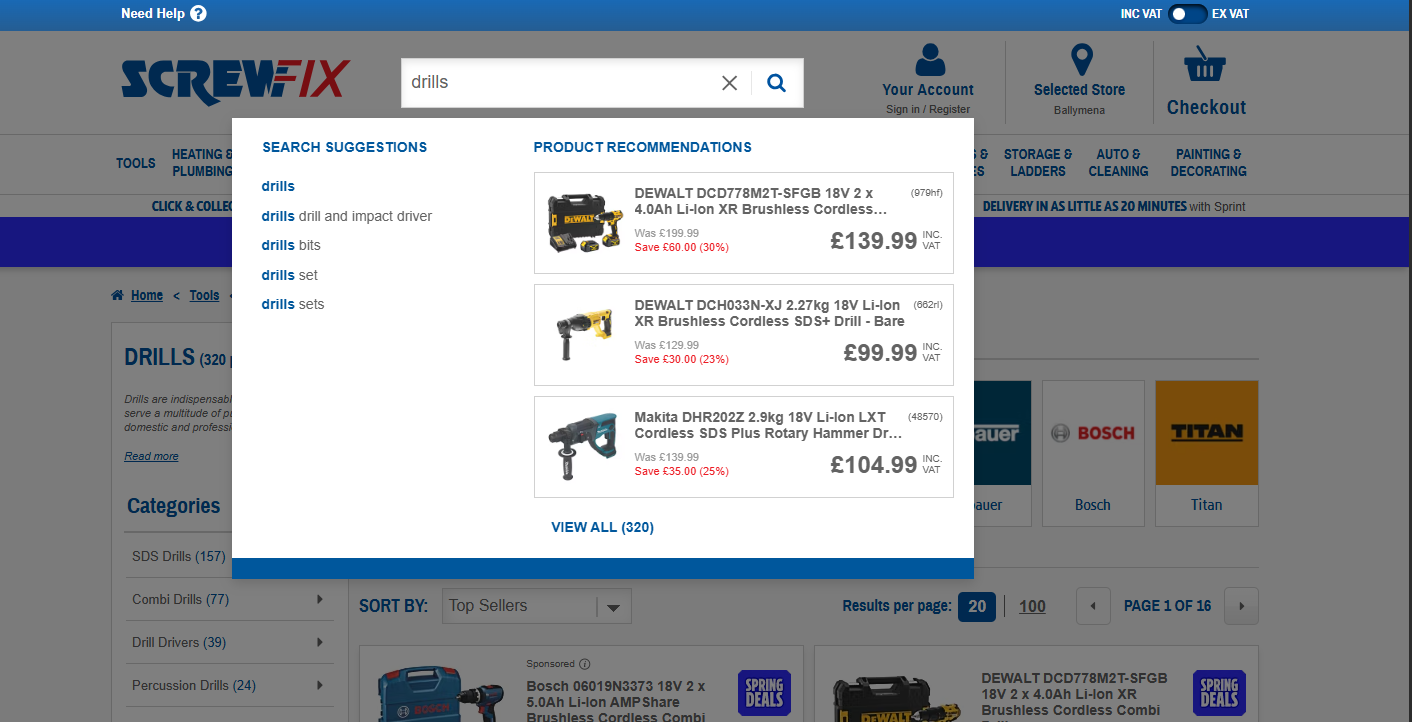
Variation 1 — Landscape layout. Search element repositioned to a horizontal overlay with two columns: search suggestions on the left and product recommendations on the right. Background darkens on focus to mirror the existing mobile pattern. Product recommendation logic preserved unchanged to isolate layout as the variable.
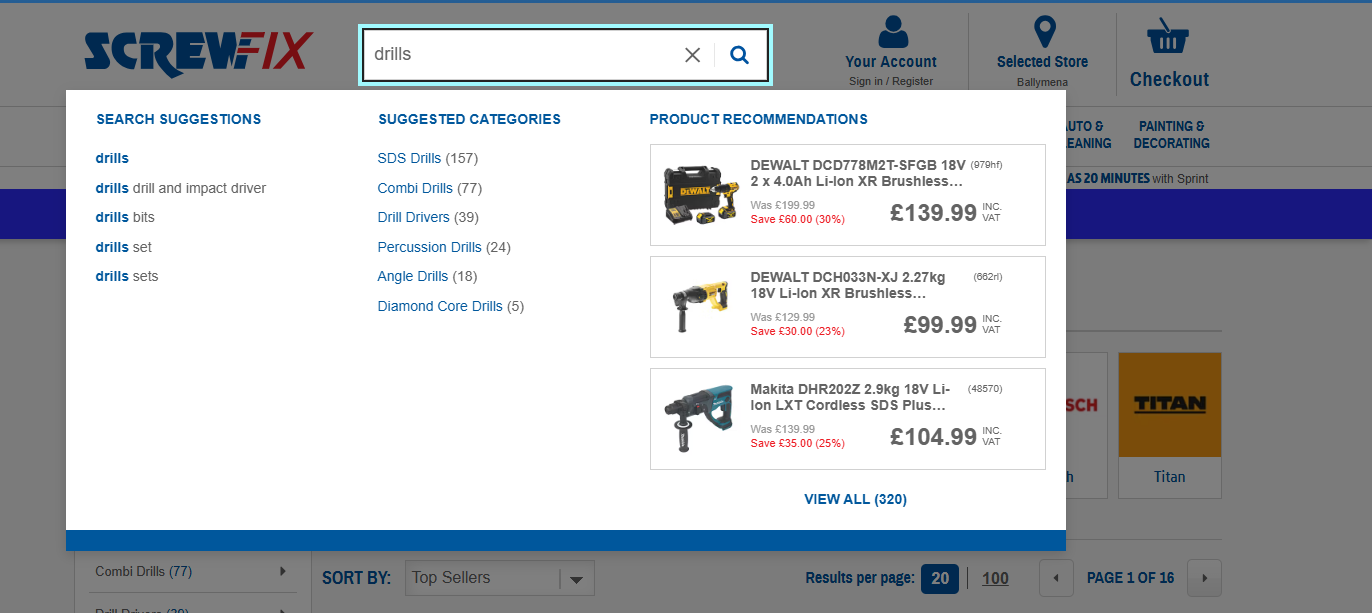
Variation 2 — Landscape with subcategories. Builds on V1 by introducing a third column of search-term-driven category recommendations between suggestions and products. Users can refine to a category-filtered SRP without going through the full results page first. A "View all" CTA preserves the original path.
Implementation
Built as an Optimizely Web IIFE on a Next.js SPA. The variant injects a complete custom search form alongside the native one, hides the native form visually, and proxies submissions back to the original submit button — preserving the host's analytics and routing while owning the entire visual experience.
Folder structure followed the agency's standard component layout: separate handlers, components,
helpers, with a single experiment.js entry point.
// Folder structure — handlers / components / helpers
SCR278/
  src/
    lib/
      components/
        customSearchForm.js
        productSuggestion.js
        searchIcon.js
        skeletonLoader.js
        spinner.js
      handlers/
        searchInputHandler.js
        searchResultKeyHandler.js
      helpers/
        utils.js
    experiment.js
    _variables.scss
    experiment.scss
    triggers.js
Custom form, native submit
The variant injects a custom form before the native one, hides the native form, and on submit proxies the value into the native input and clicks the original submit button. The host's existing search routing and analytics fire untouched.
// Inject custom form alongside the native one, hide the native form
const controlSearchForm = document.querySelector('form:has(#keyword-search)');
if (controlSearchForm) {
  controlSearchForm.insertAdjacentHTML('beforebegin', customSearchForm());
  controlSearchForm.style.display = 'none';
}

// Hide native dropdown so it doesn't compete with the custom overlay
const nativeDropdown = document.querySelector('#search-suggestions-dropdown-wrapper');
if (nativeDropdown) nativeDropdown.style.display = 'none';

// Proxy submit through the native button — preserves host routing & analytics
customForm.addEventListener('submit', (e) => {
  e.preventDefault();
  const query = customInput.value.trim();
  const nativeSubmitBtn = document.querySelector('[data-qaid="search-button"]');

  setSearchValue(query);
  renderSpinner();
  nativeSubmitBtn?.click();
  trackEvent('Search Submitted');
});
Debounced input handler
Search suggestion fetches debounce at 700ms — long enough to avoid hammering the suggestion API on every keystroke, short enough to feel responsive once the user stops typing.
const SEARCH_DEBOUNCE_DELAY = 700;

const debouncedHandler = debounce((e) => {
  searchInputHandler(e, fetchSuggestions);
}, SEARCH_DEBOUNCE_DELAY);

inputElement.addEventListener('input', debouncedHandler);
SPA-aware re-initialisation
Because the host is a Next.js SPA, route changes don't reload the page — the experiment had to
re-evaluate its conditions on every navigation. A custom onUrlChange helper wraps
history events, then a poller waits for the data layer and SPA hydration before re-running init.
// Re-init on every SPA route change
onUrlChange(() => {
  resetDom();
  window.scr278ActiveIdx = -1;

  pollerLite([
    () => typeof window.tealiumDataLayer === 'object',
    () => window.utag !== undefined,
    () => window.__NEXT_DATA__ !== undefined
  ], () => {
    setTimeout(() => {
      const input = document.querySelector('#keyword-search');
      if (input) input.value = '';
      init();
    }, DOM_RENDER_DELAY);
  });
});
Keyboard accessibility
Arrow keys navigate suggestions, Escape closes the overlay, focus management ensures clicks outside
the search element close it cleanly. searchResultKeyHandler centralises the keyboard
logic so up/down arrow navigation and Enter-to-select work consistently.
document.body.addEventListener('keydown', (event) => {
  const { key, target } = event;

  // Escape closes the overlay
  if (key === 'Escape' && target.id === `${ID}__keyword-search`) {
    target.blur();
    toggleSearchOverlay(false);
    resetDom();
  }

  // Arrow-key navigation through suggestion list
  if (target.id === `${ID}__keyword-search`) {
    searchResultKeydownHandler(event);
  }
});
Event tracking — Optimizely + GA4 dual-fire
Every event fired into both Optimizely's native event system and GA4 via a shared helper. Analysts could pull from either side without parity issues.
const trackEvent = (name) => {
  fireEvent(name);
  trackOptimizelyEvent(name);
};

// Standard events fired across all variations
trackEvent('Conditions Met');
trackEvent('Search Focus Activated');
trackEvent('Search Suggestion Clicked');
trackEvent('Product Recommendation Clicked');
trackEvent('Category Recommendation Clicked'); // V2 only
trackEvent('View All Clicked');                 // V2 only
trackEvent('Overlay Closed');
Acceptance criteria
- Desktop only, sitewide where search is available
- Two variants — landscape, and landscape with subcategories
- Background darkens on search focus to create a clear focus state
- Existing product suggestion logic preserved across variants
- Subcategory and View All CTAs route to filtered SRPs (Variation 2)
- Overlay closes on outside click or Escape
- Conditions Met fires on every page load where search is present
- Event tracking dual-fires to Optimizely and GA4
Outcome
Pre-test modelling estimated a £1.23m annual opportunity assuming a 0.5% lift in desktop search traffic at consistent CVRs. Test ran sitewide on desktop.
Post-test analysis
Results pending. This section will be updated with anonymised outcome highlights once the analysis is published and approved for share.