PLP/PDP exit-intent overlay
A two-variant test on PLP and PDP pages: a custom-built exit-intent detection system triggers a "take another look before you go" modal, with V2 enriching the modal with category-relevant clearance products fetched live from the host's own search endpoint.
The problem
PLP exit rate sat at 14.4%, with returning users leaving at 15.1% and new users at 14%. The gap by channel was substantial: organic search at 16.3%, paid search at 13.6%, affiliates at 3.63%, email at 7.4%. The pattern across user research and prior banner tests pointed to two related issues:
- Targeted, value-led promos converted well when users found them, but visibility was inconsistent — banner overload was diluting attention
- High-engagement banners didn't always convert. Post-click experience needed to match the promo's promise to retain the user
- Users on PLPs who hadn't found a price-match or criteria-match weren't being given an alternative path before leaving
The hypothesis
If we implement an exit-intent pop-up modal with value-led links to promotions or category-specific products, then we expect to see a reduction in PLP and PDP exit rates, because we are providing an immediate, alternative path to discovery for users who haven't yet found a product that matches their price or criteria.
The solution
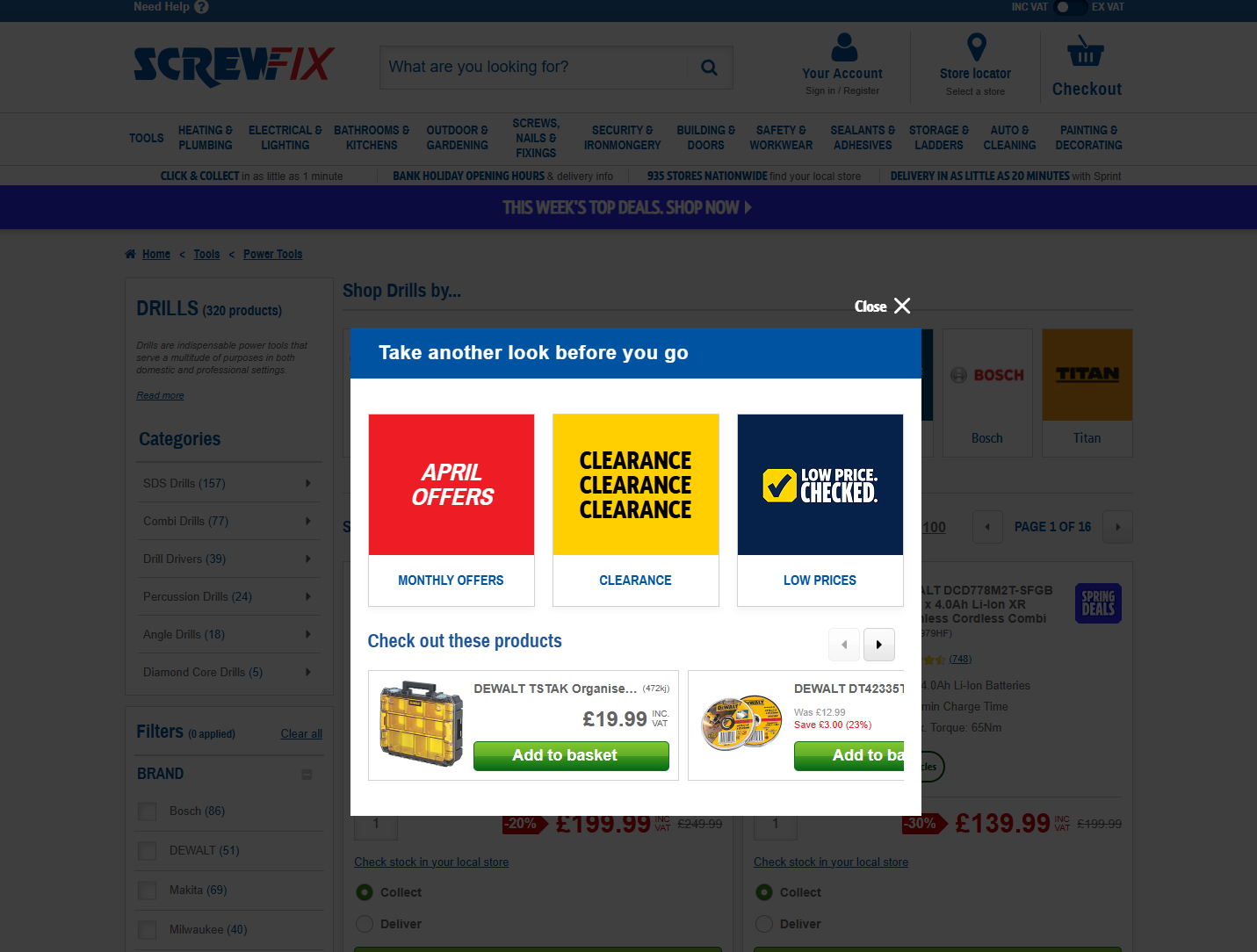
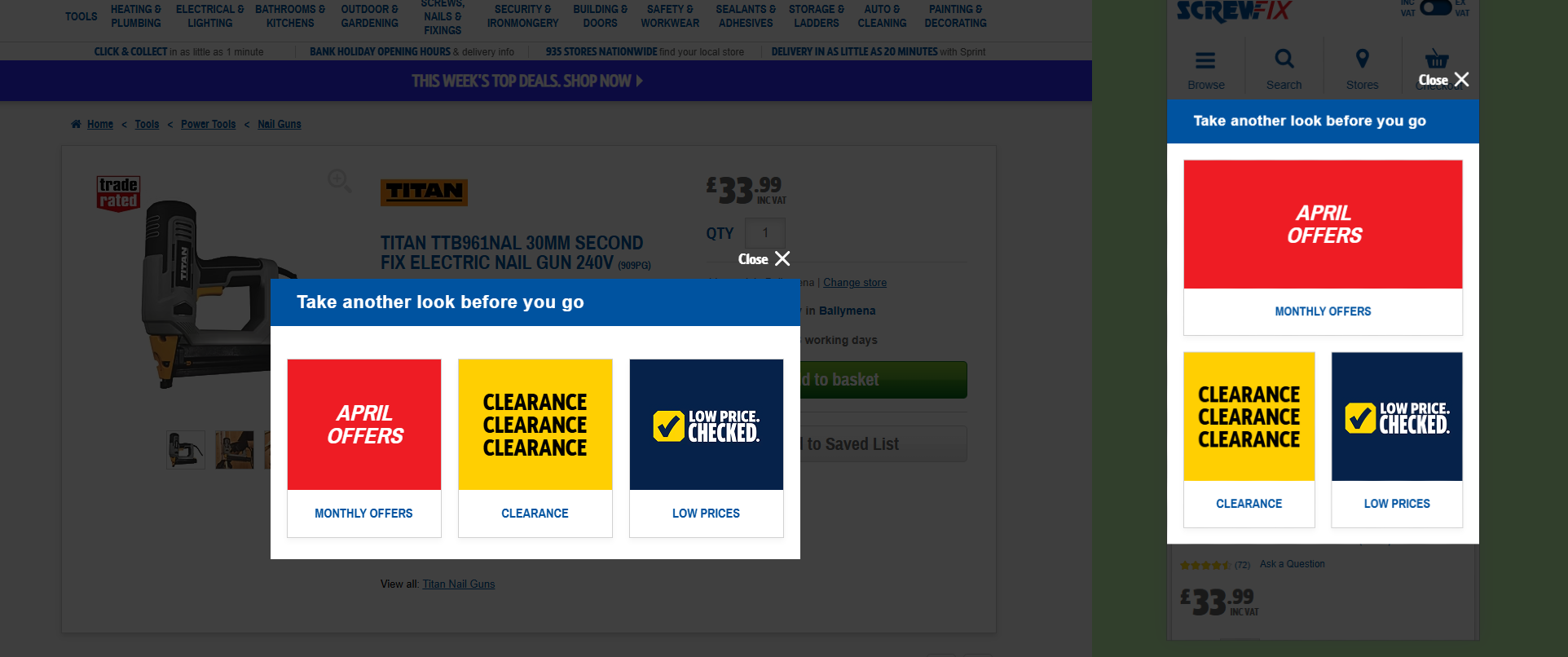
Variation 1 — Value-led category navigation. When exit intent is detected, a modal appears with a "take another look before you go" message and three large category tiles linking to Monthly Offers, Clearance, and Low Prices Checked.
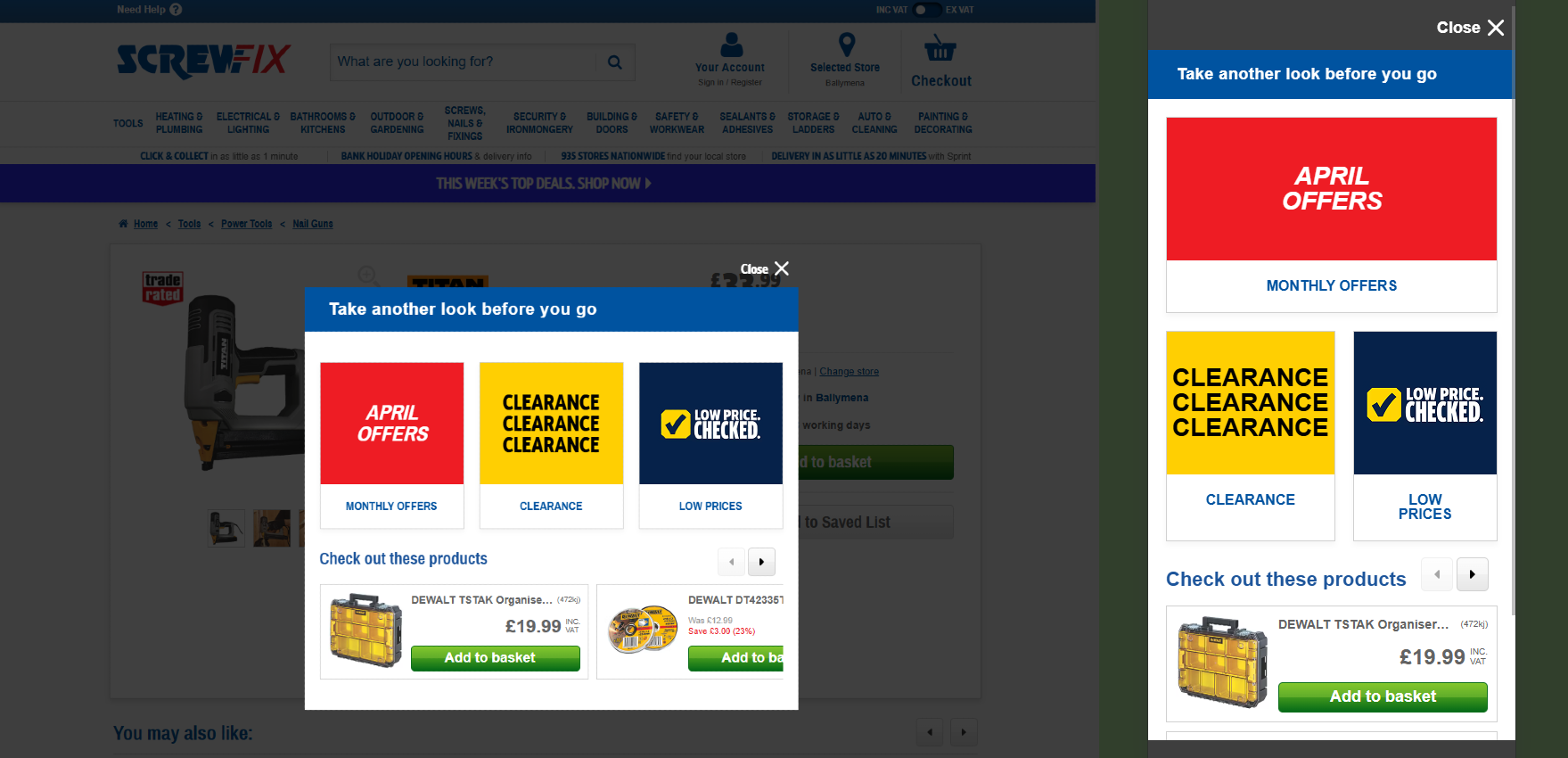
Variation 2 — Category navigation + product carousel. Builds on V1 by adding a "Check out these products" carousel below the tiles. Products are pulled live from the host's clearance category, filtered by the Tier 1 category derived from the user's current PLP/PDP breadcrumb, with a £25–£50 price range. The carousel includes inline add-to-cart with success state.
Implementation
Three architectural decisions shaped this build: a custom ExitIntent detection class (no
third-party dependency), a live HTML-scrape against the host's existing search endpoint to source
clearance products by category, and a strict accessibility layer with FocusTrap, ARIA
semantics, and keyboard parity.
The test ran on PLPs and PDPs across desktop, mobile, and tablet, with different inactivity thresholds per device class.
// Folder structure
SCR180/
  src/
    lib/
      components/
        modal.js
        product.js
        productsWrapper.js
        spinner.js
      helpers/
        initSwiper.js
        storeProduct.js
        swiper.js
        utils.js
    experiment.js
    _swiper.scss
    _variables.scss
    experiment.scss
    triggers.js
Custom ExitIntent class
Built as a small, dependency-free class with multiple detection signals: mouse trajectory toward
browser tabs and close area on desktop, inactivity timers (30s desktop, 15s mobile), scroll-speed
threshold, and a tab-switch counter for users bouncing between tabs. fireOnce ensures
one trigger per session; onExit fires for analytics regardless of whether the modal
showed.
exitIntent = new ExitIntent({
  inactivityTimeout: isMobile() ? 15000 : 30000,
  scrollSpeedThreshold: 3,
  sensitivity: 20,
  fireOnce: true,
  tabSwitchThreshold: 3,
  tabSwitchWindow: 120000,

  // Same modal logic for both first exit-intent and welcome-back triggers
  onExitIntent: showOverlay,
  onWelcomeBack: showOverlay,

  // Fires when user actually leaves — for analytics regardless of overlay
  onExit: ({ device }) => {
    const pageType = isPDP() ? 'PDP' : isPLP() ? 'PLP' : 'other';
    fireEvent(`${ID}-exit_intent_leave`);
  },
});
Session-aware show logic
The modal shows once per session (fireOnce on the detector), and dismissal persists for
the session via sessionStorage. The overlay is also gated to PDP and PLP only — even if
exit intent fires elsewhere, the modal won't render. This kept the test scope tight to where the
brief targeted.
const showOverlay = ({ source, device }) => {
  fireEvent('Conditions Met');
  trackEvent('Conditions Met');

  if (VARIATION === 'control') return;

  // Dismissal persists for the session
  if (sessionStorage.getItem(`${ID}-modalClosed`) === 'true') return;

  // Restrict modal to PDP/PLP only
  if (!isPDP() && !isPLP()) return;

  closeModal(); // remove any stale modal first

  const overlay = document.createElement('div');
  overlay.className = `${ID}-modal-overlay`;
  overlay.id = `${ID}-modalOverlay`;
  overlay.innerHTML = modal(ID, VARIATION);
  document.body.appendChild(overlay);
};
Live category-aware product fetch (V2)
V2 needed clearance products relevant to the user's current Tier 1 category, in a £25–£50 price
range. Rather than building a new endpoint, the experiment scrapes the host's own search results
page for the clearance promo, filtered by the parent category from the breadcrumb.
DOMParser extracts SKU IDs, then a separate hydration call fetches full product data.
const fetchClearanceSkus = (categoryId, priceFrom = 5, priceTo = 25) => {
  const url = `/search?search=marchdealspromo&category=${categoryId}` +
              `&price_from=${priceFrom}&price_to=${priceTo}&sort_by=-relevance`;

  return fetch(url)
    .then((res) => res.text())
    .then((html) => {
      const doc = new DOMParser().parseFromString(html, 'text/html');
      return [...doc.querySelectorAll('[data-qaid="sku"]')]
        .map((el) => el.textContent.trim().replace(/[()]/g, ''));
    });
};

// Parent category from breadcrumb (Tier 1)
const getParentId = (breadcrumb) => {
  const elem = breadcrumb || document.querySelector('[data-qaid="breadcrumb-qa"]');
  const links = elem.querySelectorAll('li a[href]');
  return links.length >= 2
    ? links[1].getAttribute('href').split('/').pop()
    : null;
};
Accessibility — FocusTrap and ARIA
The modal uses a custom FocusTrap utility scoped to the modal container and close
button. Activated when the modal renders, deactivated on close. Keyboard parity ensures
Tab cycles inside the modal, Escape dismisses, and focus returns to the
triggering element after close.
// Activate trap once products have hydrated and modal is fully rendered
pollerLite([() => typeof window.Swiper === 'function'], () => {
  initSwiper(`.${ID}__products`);

  window.trapFocus = new window.FocusTrap(
    `.${ID}-modal-container`,
    `.${ID}-modal-close`
  );
  window.trapFocus.activate();

  fireEvent('product recs visible');
});

// On close — deactivate trap and remove modal
const closeModal = () => {
  const modal = document.getElementById(`${ID}-modalOverlay`);
  if (modal) modal.remove();
  window.trapFocus?.deactivate();
};
Inline add-to-cart with success state
The product carousel ATB doesn't navigate — it adds to basket via the host's cart API, then swaps the
button for a "1 in your basket / Checkout Now" success block. aria-busy toggles during
the request, a spinner renders inside the button, and the original button DOM is replaced cleanly
after success.
if (target.closest(`.${ID}__atc`)) {
  const btn = target.closest(`.${ID}__atc`);
  const sku = btn.getAttribute('data-sku');
  if (!sku) return;

  btn.insertAdjacentHTML('beforeend', spinner(ID));
  target.setAttribute('aria-busy', 'true');

  addToCart(sku)
    .then(() => {
      trackEvent('ATC Clicked - from recs module');
      target.setAttribute('aria-busy', 'false');
      btn.querySelector(`.${ID}__spinner`).remove();

      const successHtml = `
        <div class="QTG7m_" data-qaid="in-basket-text" aria-live="polite">
          <div class="WRPQQe">1 in your basket</div>
          <a href="/basket" tabindex="0">Checkout Now</a>
        </div>`;

      btn.insertAdjacentHTML('afterend', successHtml);
      btn.remove();
    })
    .catch(() => {
      target.setAttribute('aria-busy', 'false');
      btn.querySelector(`.${ID}__spinner`).remove();
    });
}
Acceptance criteria
- Test runs on desktop, mobile, and tablet
- Targets PLP and PDP only
- Two variants — V1 (category links), V2 (category links + product carousel)
- Desktop trigger: mouse movement toward browser tabs/close area, OR 30 seconds inactivity
- Mobile trigger: 15 seconds inactivity
- Modal shows once per session
- Dismissal persists for the session
- V2 products: same Tier 1 category as current PLP/PDP, £25–£50 price range
- Modal is keyboard accessible with focus trap and Escape-to-close
Success metrics
Primary metric: exit rate of PLP and PDP. Secondary: re-engagement rate (tile or product click followed by continued browsing), ATB rate from the V2 carousel, conversion rate of overlay-engaged users.
Pre-test context
Pre-test data informed both the page targeting and the messaging. Targeted product deals (e.g. "Save 60% on TurboGold Trade Woodscrews") had shown both engagement and conversion strength in prior tests, validating the value-led tile approach in V1. Banner overload had been identified as a likely contributor to PLP exit — supporting V2's narrower, category-aware product surface as a less noisy alternative.
Post-test analysis
Results pending. This section will be updated with anonymised outcome highlights once the analysis is published and approved for share.