Customer gallery homepage integration
A homepage experiment that live-fetches the host's customer gallery, injects it into the page, and turns each image into a product modal with inline AJAX sample ordering — built without static content duplication, working with Magento's native cart and notification system.
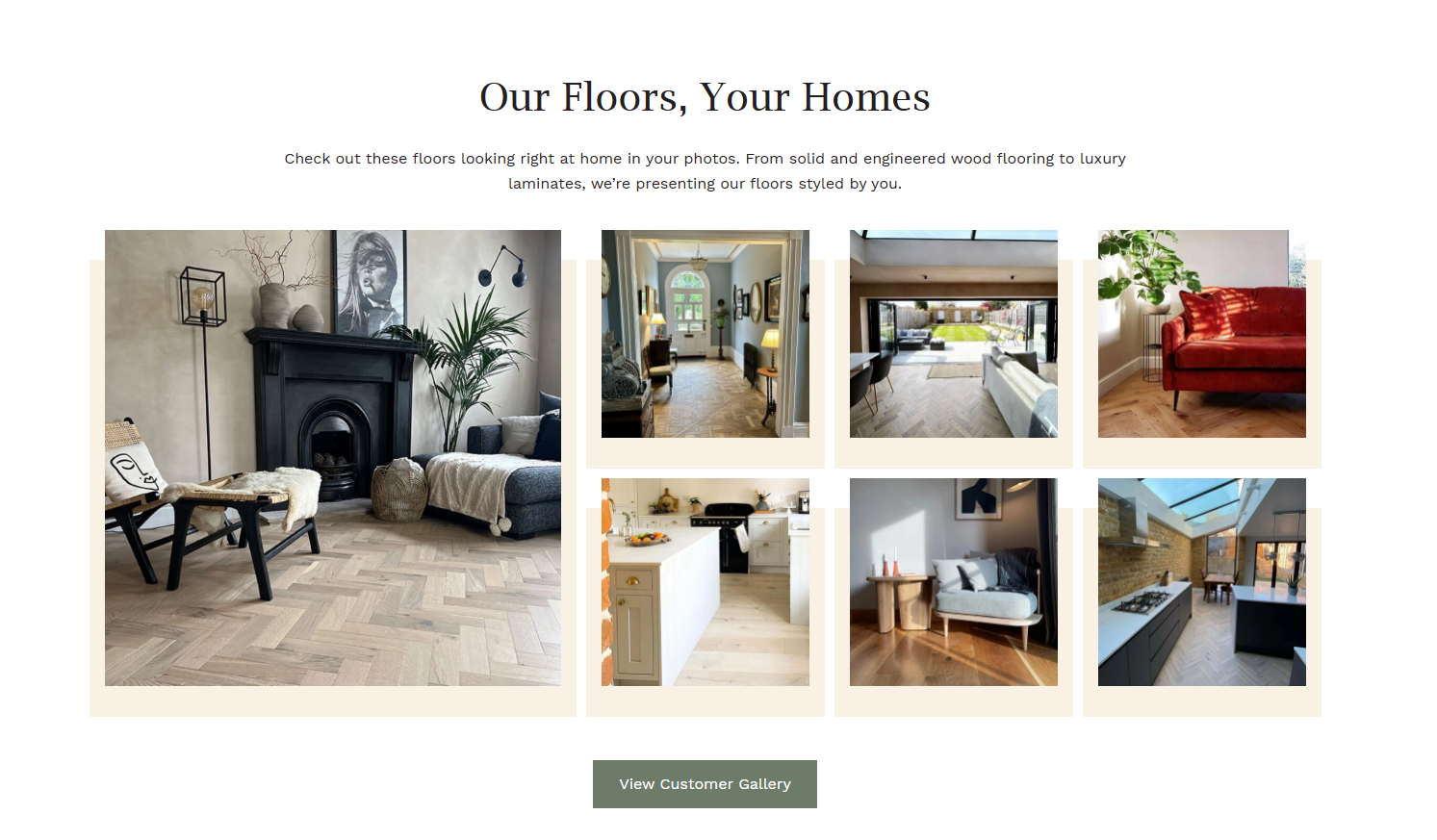
The problem
The customer gallery — real photos of installed flooring in customers' homes — was strong social
proof, but it sat on a separate /customer-gallery page that most homepage visitors
never reached. The asset was doing its job for users who navigated to it, but the navigation step
itself was the barrier. The hypothesis was that surfacing this content directly on the homepage
would build trust earlier in the journey and increase engagement with the high-intent "Order a Free
Sample" flow.
The hypothesis
Visitors who see real customer installs on the homepage are more likely to trust the brand, explore products, and convert — particularly via the high-intent "Order a Free Sample" flow. Bringing the gallery in-page removes a navigation barrier and increases engagement with social proof earlier in the journey.
The solution
The experiment makes six coordinated changes on the homepage:
- Gallery injection — live-fetch the customer gallery page, parse it, inject the gallery section directly into the homepage
- Progressive reveal — show 8 items initially, with a "View Customer Gallery" button expanding the full grid
- Product modal — click any gallery image to open a modal showing the product name, SKU, flooring type, thumbnail, and CTAs
- Inline AJAX sample ordering — "Order a Free Sample" adds to cart without page navigation, with success/error/sample-limit handling
- About Us refresh — moved to the bottom of the page with updated copy and imagery aligned to the new brand narrative
- Press features strip — new "As Seen On" logo strip above the existing one, with the original hidden to avoid duplication

Implementation
Three engineering decisions shaped the build: live cross-page DOM fetching to avoid maintaining a static content copy, scraping product form data from PDPs to power AJAX sample submissions through Magento's native cart, and cloning the host's existing success/error notifications rather than building a custom toast system.
Event delegation off a single body listener handles every modal interaction — image clicks, modal close, sample submission — keeping the JS surface small and SPA-resistant.
// Folder structure
LF191/
  src/
    lib/
      components/
        button.js
        modal.js
        modalContent.js
        pressFeatures.js
      helpers/
        closeModal.js
        fetchProductData.js
        openModal.js
        utils.js
      services/
      shared/
    experiment.js
    _variables.scss
    experiment.scss
    index.html
Live gallery fetch and injection
Rather than copying the gallery HTML into the experiment (which would go stale every time the gallery
was updated), the experiment fetches the live /customer-gallery page, parses it with
DOMParser, extracts the main content block, and injects it directly into the homepage.
The gallery stays in sync with the source automatically.
const getDOMFromURL = async (url) => {
  try {
    const res = await fetch(url, { mode: 'cors' });
    const html = await res.text();
    return new DOMParser().parseFromString(html, 'text/html');
  } catch (err) {
    console.error('Failed to fetch or parse:', err);
    return null;
  }
};

// Inject gallery below the USP bar, then progressively reveal first 8 items
getDOMFromURL('/customer-gallery').then((doc) => {
  if (!doc) return;

  const mainContent = doc.querySelector('.column.main');
  mainContent.classList.add(`${ID}__photoGalarySection`);

  if (!document.querySelector(`.${ID}__photoGalarySection`)) {
    targetPoint.insertAdjacentElement('afterend', mainContent);
  }

  // Show first 8 items, hide the rest until "View Gallery" expands them
  const gallerySection = document.querySelector(`.${ID}__photoGalarySection`);
  if (!document.querySelector(`.${ID}__btnWrapper`)) {
    gallerySection.insertAdjacentHTML('beforeend', buttonElem(ID));
  }
  hideElement();
});
Scraping PDP form data for AJAX cart submission
Magento's "add free sample" action requires four pieces of data to submit cleanly: product ID, item value, form key (CSRF token), and form action URL. None of these are available from the gallery image itself — they live on the PDP. So the experiment fetches the product's PDP, parses it, extracts the form data, then submits the sample request through Magento's existing cart endpoint.
This is the pattern that makes the inline ATB feel native — the user never leaves the homepage, but the request hits the same Magento controllers as a real PDP submission would.
// Click a gallery image → fetch PDP, scrape form data, populate modal
if (target.closest(`.${ID}__photoGalarySection`) && target.closest('.grid-item')) {
  const clickedItem = target.closest('.grid-item');
  const imageElem = clickedItem.querySelector('img');
  const modalElem = document.querySelector(`.${ID}__modal`);
  const modalInnerContent = modalElem.querySelector('.modal-inner-content');

  modalInnerContent.innerHTML = modalContent(ID, imageElem.dataset);

  fetchProductDetails(imageElem.dataset.link)
    .then(({ productValue, itemValue, formKeyValue, formAction }) => {
      // Stash on the modal for the eventual sample submission
      modalElem.dataset.itemValue = itemValue;
      modalElem.dataset.formKey = formKeyValue;
      modalElem.dataset.formAction = formAction;
      modalElem.dataset.sku = imageElem.dataset.sku;
      modalElem.dataset.productValue = productValue;

      openModal(ID);
    });
}
Sample submission with limit detection
Magento enforces a per-product sample limit through cart metadata. Rather than guessing at the limit
client-side, the experiment submits the request, then polls Magento's own
mage-cache-storage in localStorage to read the cart state — including the
sample_individual_limit_reached flag on each line item — and updates the button
accordingly.
This means the limit logic always matches what Magento itself thinks the user is allowed to do. No second source of truth.
if (target.closest(`.${ID}__sampleBtn`)) {
  e.preventDefault();
  const button = target.closest(`.${ID}__sampleBtn`).querySelector('button');
  const formKey = getCookie('form_key');
  const { sku, productValue, itemValue, formAction } = modalElem.dataset;

  addToSampleCart(productValue, formKey, itemValue, formAction)
    .then((response) => {
      if (!response.success) {
        button.textContent = 'Sample limit reached';
        button.classList.add(`${ID}__disabled`);
        showErrorNotification();
        return;
      }

      button.textContent = 'Added to basket';
      button.classList.add(`${ID}__disabled`);

      // Read Magento's own cart state to detect sample-limit hits
      pollerLite([
        () => window.localStorage.getItem('mage-cache-storage'),
        () => JSON.parse(window.localStorage.getItem('mage-cache-storage')),
        () => JSON.parse(window.localStorage.getItem('mage-cache-storage')).cart
      ], () => {
        const { cart } = JSON.parse(window.localStorage.getItem('mage-cache-storage'));
        const isLimitReached = cart.items.find(
          (item) => item.product_sku === sku && item.sample_individual_limit_reached
        );

        if (isLimitReached) {
          button.textContent = 'Sample limit reached';
          button.classList.add(`${ID}__disabled`);
        }

        showSuccessNotification();
      });
    });
}
Cloning host notifications instead of building a custom toast
Magento renders success and error messages through a .page.messages block with
established styling. Instead of building a separate toast system that would need maintenance and
could drift from the host's design, the experiment polls for the host's own notification block,
clones it, and surfaces it to the user. The visual treatment, colour palette, and animation are all
the host's — the experiment just makes them appear at the right moment in the modal flow.
const showSuccessNotification = () => {
  pollerLite([
    `.page.messages:not(.${ID}__showSuccessNotification) .messages .message-success`
  ], () => {
    const source = document.querySelector(
      `.page.messages:not(.${ID}__showSuccessNotification)`
    );
    const clone = source.cloneNode(true);

    if (!document.querySelector(`${ID}__showSuccessNotification`)) {
      document.body.insertAdjacentElement('beforeend', clone);
      clone.classList.add(`${ID}__showSuccessNotification`);
    }
  });
};
Single delegated click handler
Every interaction — gallery image click, modal close, sample submission, overlay backdrop click —
runs through one delegated listener on document.body. No per-element listeners, no
cleanup logic on modal open/close, no risk of duplicate handlers across re-renders.
document.body.addEventListener('click', (e) => {
  const { target } = e;

  // Gallery image → open modal
  if (target.closest(`.${ID}__photoGalarySection`) && target.closest('.grid-item')) {
    // ...open modal flow
  }

  // Close button or overlay backdrop → close modal
  else if (
    (target.closest('.action-close') || target.closest('.modals-overlay')) &&
    target.closest(`.${ID}__modal`)
  ) {
    closeModal(ID);
  }

  // Sample CTA → AJAX submit
  else if (target.closest(`.${ID}__sampleBtn`)) {
    // ...sample flow
  }
});
What's measured
Primary metric: sample CTR (modal open → add to basket). Secondary: PDP visits from "View Product" clicks, gallery image click rate, and "View Customer Gallery" expand rate.
Technical notes
- Gallery content is fetched live — no stale data, automatic sync with the source page
- Event delegation: a single
document.bodyclick listener handles all modal interactions pollerLitehandles resilient DOM targeting across async page elements (USP bar, About Us section, press features)- Product form data (product ID, item value, form key, action URL) is scraped from each PDP to power AJAX add-to-cart through Magento's existing controllers
- Experiment class
lf191is added to<html>so all SCSS scopes cleanly without global style leakage - Success and error notifications clone the host's native Magento UI rather than introducing a parallel toast system
Post-test analysis
Results pending. This section will be updated with anonymised outcome highlights once the analysis is published and approved for share.