Comparison PLP — bundle product removal
A surgical edit to three comparison PLPs: remove bundled cover products that were hurting renewal rates, restructure the grid to suit fewer items, re-initialise the host's Swiper carousel cleanly, and inject a new navigation entry to the dedicated bundle page after first visit.
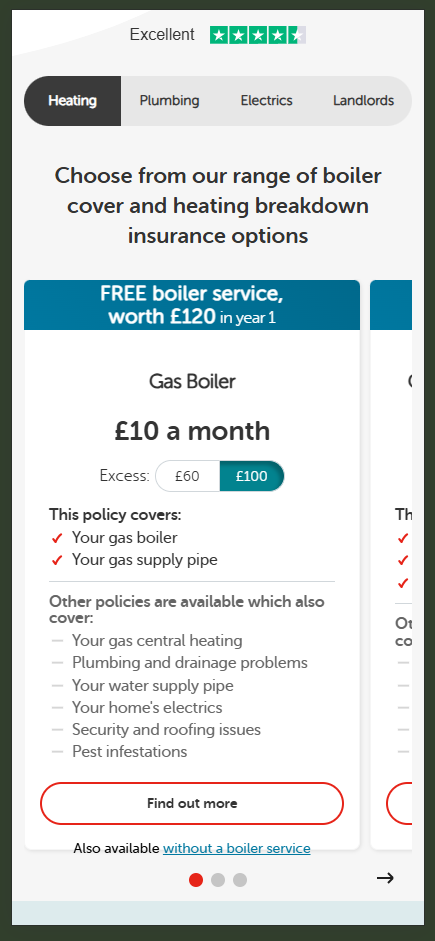
The problem
Internal data on cover renewals showed a consistent pattern: customers who purchased bundled products (Gas Combo Cover variants — Heating + Plumbing, Heating + Plumbing + Electrics, etc.) were less likely to renew their cover after the first year compared to customers who bought single-category cover. Bundles were generating revenue in year one but eroding the long-term customer base.
Stakeholders aligned on a structural change: pull the bundles out of the main comparison PLPs so single-category products had cleaner focus, and house the bundles on a separate dedicated page. The test would validate whether the cleaner comparison experience drove higher progression to PDPs.
The hypothesis
Because we saw lower renewal rates and reduced profitability from customers purchasing Gas Combo Products, we believe removing them from the Heating, Plumbing, and Electrics comparison PLPs and placing them on a separate URL will result in greater focus on single-category products, higher progression into PDPs, and a more sustainable long-term revenue mix.
The solution
Three coordinated changes on the variant:
- Remove Gas Combo products from three comparison PLPs (Heating, Plumbing, Electrics) by matching against a known list of bundle product URLs
- Restructure the grid from 3-up to 2-up so the remaining products don't render in a half-empty layout
- Inject a nav link to the new dedicated bundle page (HomeServe Premium Cover) into the Home Cover dropdown — but only after the user has visited a comparison PLP, so the new entry follows the journey rather than appearing cold
The grid restructure required tearing down and rebuilding the host's Swiper instance, since the existing carousel was sized to a 3-slide layout and would have rendered awkwardly with two.
Implementation
The challenge here wasn't building anything new — it was editing an existing PLP cleanly without
breaking the host's carousel, navigation, or routing. Three patterns mattered: matching by URL
rather than DOM heuristics (resilient to host re-renders), re-initialising Swiper safely (destroy
first, then construct), and using sessionStorage to gate the navigation injection so it
only fires after the qualifying journey.
// Folder structure
HOME120/
  src/
    lib/
      helpers/
        utils.js
    experiment.js
    _variables.scss
    experiment.scss
    triggers.js
Targeting bundle products by URL, not DOM heuristics
Bundle products could be identified by their hardcoded URLs — a list of known bundle paths covering both standard and "xs1" variants. Matching this way is more durable than matching by product name, price, or layout position, all of which the host could change without notice.
Once matched, the bundle's promo box is hidden and removed from the Swiper slide pool so it doesn't
take up a slot in the carousel. The parent grid container's class is swapped from
grid-33x3 to grid-50x2 to render cleanly with the smaller item count.
const itemsToHide = [
  '/insurance/heating-plumbing-cover-service-xs1',
  '/insurance/heating-plumbing-electrics-cover-service-xs1',
  '/insurance/heating-plumbing-electrics-plus-cover-service-xs1',
  '/insurance/heating-plumbing-cover-service',
  '/insurance/heating-plumbing-electrics-cover-service',
  '/insurance/heating-plumbing-electrics-plus-cover-service',
];

itemsToHide.forEach((href) => {
  const element = document.querySelector(`.promo-box:has(a[href="${href}"])`);
  if (!element) return;

  // Hide and remove from the Swiper slide pool
  element.classList.add('hidden');
  element.classList.remove('swiper-slide');

  // Restructure the grid to suit fewer items
  const parent = element.parentElement;
  parent?.classList.remove('grid-33x3');
  parent?.classList.add('grid-50x2');
});
Safely re-initialising Swiper after layout change
The host's existing carousel was already initialised on page load with a 3-slide configuration. Removing slides without destroying the carousel first leaves the Swiper instance referencing dead DOM nodes — the dots, navigation arrows, and slide widths get out of sync, and you end up with a visibly broken carousel.
The fix is straightforward but easy to miss: walk every .swiper on the page, call
destroy(true, true) to clean up styles and event listeners, null out the instance, then
construct a fresh Swiper with the new slide configuration.
if (hasSwiper()) {
  const swiperElem = document.querySelector('.swiper');
  swiperElem.classList.add('adjusted-swiper');

  // Tear down every existing instance — clears styles AND event listeners
  document.querySelectorAll('.swiper').forEach((el) => {
    if (el.swiper) {
      el.swiper.destroy(true, true);
      el.swiper = undefined;
    }
  });

  // Build fresh with the new slide configuration
  new Swiper('.swiper', {
    slidesPerView: 1.2,
    spaceBetween: 10,
    loop: false,
    pagination: { el: '.swiper-pagination', clickable: true },
    navigation: {
      nextEl: '.swiper-button-next',
      prevEl: '.swiper-button-prev',
    },
  });
}
Conditional navigation injection
The new bundle page link should appear in the Home Cover dropdown — but only after the user has visited a comparison PLP. Showing it cold to every visitor would change the navigation experience site-wide, which wasn't the test's intent.
The flag persists in sessionStorage, and desktop and mobile use different attach points
because the host's nav structure differs between viewports — desktop uses a hover dropdown, mobile
uses a slide-out drawer at .navitem-8.
const newNavItem = `
  <li>
    <a class="dropdown-item dropdown-item-link"
       href="/insurance-cover/homeserve-premium-cover"
       class="navlink">
      HomeServe Premium Cover<span class="caret"></span>
    </a>
  </li>
`;

// Different attach points per viewport — desktop dropdown vs mobile drawer
const attachPoint = !isMobile()
  ? document.querySelector('.dropdown-menu ul:first-of-type > li:nth-child(4)')
  : document.querySelector('.navitem-8 ul:first-of-type > li:nth-child(4)');

if (attachPoint) {
  attachPoint.insertAdjacentHTML('afterend', newNavItem);
  sessionStorage.setItem('hs120nav', 'true');
}
Nav-position tracking via class injection
One small but useful pattern: top-level nav items had no stable hooks for analytics — no
data- attributes, no IDs. Rather than chasing nth-child selectors in event handlers,
the experiment adds a numbered class (navitem-1, navitem-2, etc.) to every
top-level nav item on first run. This gives both the experiment code and downstream analytics
consistent hooks.
// Tag every top-level nav item with its position
const navItems = document.querySelectorAll('ul.nav > li');
navItems.forEach((item, index) => {
  item.classList.add(`navitem-${index + 1}`);
});

// Now event handlers can use stable selectors
document.body.addEventListener('click', (e) => {
  const { target } = e;

  if (target.closest('.navlink[href="/insurance-cover/homeserve-premium-cover"]')) {
    fireEvent('User clicks on HomeServe Premium Cover link');
  } else if (
    target.closest('.navitem-2') ||
    (target.closest('.navitem-8') && isMobile())
  ) {
    fireEvent('User clicks on home cover link in main nav');
  }
});
Acceptance criteria
- Test runs on desktop, mobile, and tablet
- Targets three comparison PLPs: gas-and-boiler, plumbing-and-drainage, electrical
- One variation against control
- Gas Combo bundle products removed from all three PLPs
- Single-category products render cleanly in a 2-up grid layout
- Swiper carousel re-initialises without visual breakage
- New nav link to HomeServe Premium Cover appears in the Home Cover dropdown after visiting any comparison PLP
- Test code fired event surfaces on every user view of a comparison PLP
Success metrics
Primary metrics: PDP views from PLP, add-to-basket rate, bounce rate from PLP. Secondary tracking: clicks on the new nav link, views of the dedicated HomeServe Premium Cover PLP, and clicks on the existing Home Cover nav entry as a baseline reference.
Strategic context
Aligned to the OKR 2 goal of increasing product views from comparison pages. The test reflects a strategic decision to optimise for renewal-rate health rather than headline conversion — a longer time horizon than a typical CRO test. Stakeholders accepted that this might suppress short-term revenue if it surfaced as a negative result, in exchange for a more sustainable long-term customer base.
Post-test analysis
Results pending. This section will be updated with anonymised outcome highlights once the analysis is published and approved for share.