Bestsellers carousel — homepage social proof
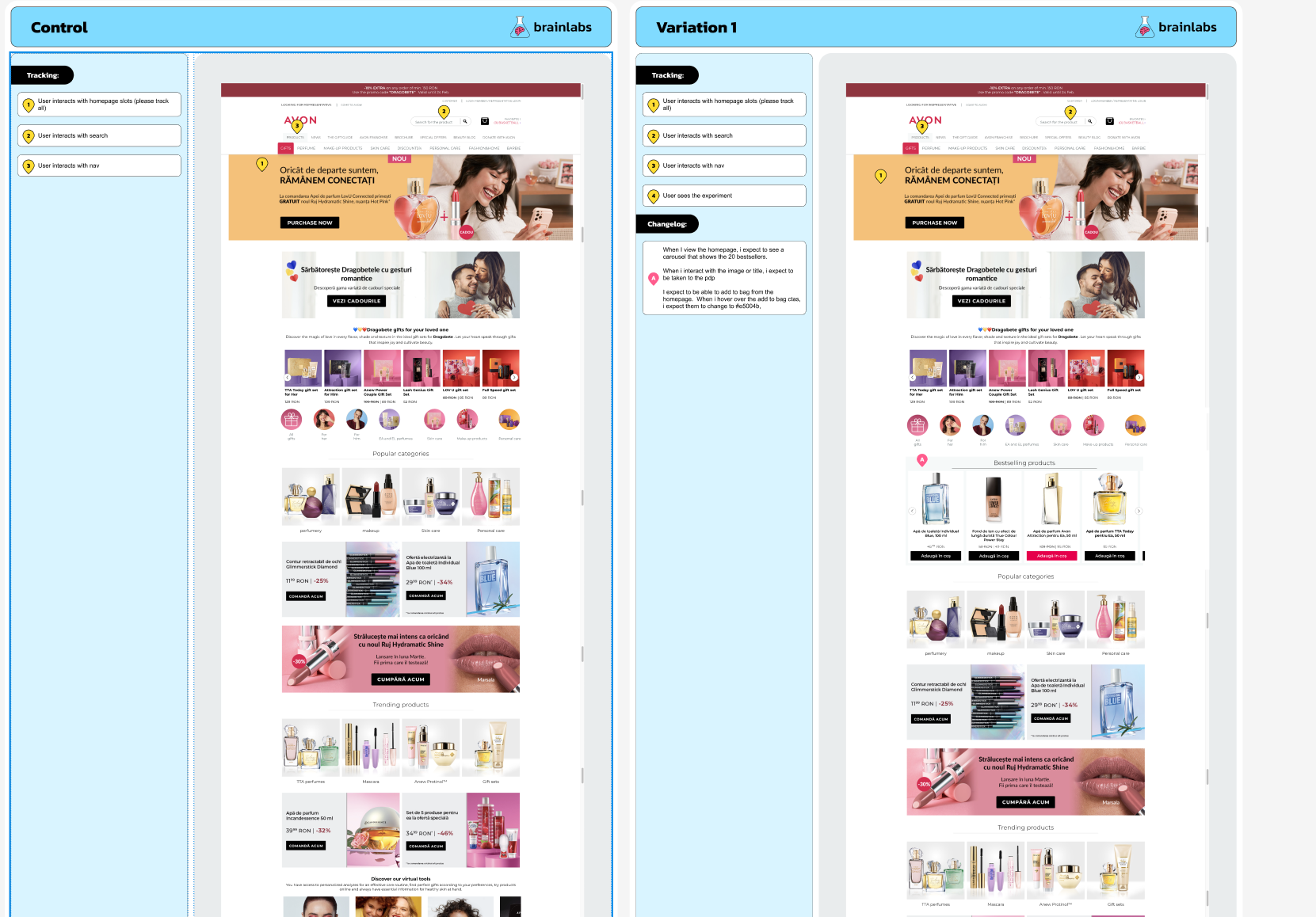
A homepage social-proof test running on the Romanian Avon site through
Dynamic Yield: a 19-product bestsellers carousel with a desktop variant-selector dropdown, a mobile
bottom-sheet variant picker, and inline add-to-bag through the host's
CartServiceModule. Visibility-gated impression events on both control and variant for
clean exposure measurement.
The problem
A competitor review identified social-proof patterns as a strong opportunity across the Avon UK site. The original plan was to validate the hypothesis on UK traffic, but off-boarding work made UK runtime untenable — there wasn't enough time left in the engagement to reach significance on the planned primary metric.
The Romanian site was a viable alternative: traffic profile sufficient to reach significance inside a tighter window, same underlying hypothesis — that surfacing what other shoppers were buying would lift add-to-bag rate, particularly for users still browsing.
The hypothesis
We believe that adding a carousel that showcases the bestselling products for all users will result in increased add-to-bag rate. This is due to users trusting what other users have brought.
The solution
Variation 1 injects a 19-product bestsellers carousel into the homepage, with two key interaction patterns:
- Variant selection — products with multiple variants (shade, size, finish) expose a dropdown on desktop and a bottom-sheet picker on mobile. Selecting a variant updates the card's preview image and rebinds the add-to-bag SKU.
- Inline add-to-bag — clicking the CTA submits through Avon's
CartServiceModuledirectly, bypassing a PDP visit. The page scrolls to top so the host's mini-cart UI updates in view.
Both control and variant fire impression events through the same IntersectionObserver pattern — control on the header element, variant on the carousel wrapper — so exposure measurement is consistent across arms.

Implementation
Four patterns shaped the build: device-aware DOM targeting through Dynamic Yield's
window.DY object (different anchor points for desktop vs mobile/tablet),
IntersectionObserver-gated "Conditions Met" firing on both control and variant, a desktop dropdown /
mobile bottom-sheet variant picker with synced state, and AJAX add-to-bag through the host's
existing cart service.
// Folder structure
AG125/
  src/
    lib/
      components/
        productCard.js
        productCards.js
        mobileVariant.js
        mobileVariants.js
        variantOption.js
        variantOptions.js
      helpers/
        addToCart.js
        closeVariantDropdown.js
        getProductDetails.js
        initSwiper.js
        swiper.js
        utils.js
    experiment.js
    _swiper.scss
    _variables.scss
    experiment.scss
    triggers.js
Visibility-gated "Conditions Met" — on both arms
A common mistake on homepage tests is firing the conditions event on page load — which inflates exposure counts with users who never actually saw the variant. Here, an IntersectionObserver watches the carousel wrapper at 100% visibility threshold, and "Conditions Met" only fires when the element is fully in view. A sentinel class prevents repeat firing on scroll oscillation.
The control arm uses the same pattern but observes the header element — giving both arms a comparable, scroll-gated exposure definition.
// Single intersection callback — sentinel guards repeat firing
const intersectionCallback = (entry) => {
  if (entry.isIntersecting && !document.querySelector(`.${ID}__seen`)) {
    entry.target.classList.add(`${ID}__seen`);
    fireEvent('Conditions Met');
  }
};

if (VARIATION === 'control') {
  // Same gating pattern as variant — observe header for parity
  obsIntersection(document.querySelector('header'), 1, intersectionCallback);
  return;
}

// Variant — observe the carousel wrapper instead
obsIntersection(
  document.querySelector(`.${ID}__carousel__wrapper`),
  1,
  intersectionCallback
);
Device-aware anchor targeting via Dynamic Yield
The homepage layout differs between desktop and mobile/tablet — different containers, different IDs,
different scroll regions. Rather than reading the user-agent string, the experiment uses Dynamic
Yield's own device classification through window.DY.deviceInfo.type, which stays
consistent with how the rest of the host's targeting evaluates device.
The poller waits for both Swiper to be available globally and the device-specific anchor to render before injecting — important because the Romanian homepage builds in stages.
pollerLite([
  () => typeof window.Swiper === 'function',
  () => document.querySelector('#m-2nd-banner-1') ||
        document.querySelector('#d-2nd-parfumuri')
], () => {
  const isMobile = window.DY.deviceInfo.type !== 'desktop';

  const attachPoint = !isMobile
    ? document.querySelector('#d-2nd-parfumuri')
    : document.querySelector('#m-2nd-banner-1');

  if (!attachPoint) return;

  attachPoint.insertAdjacentHTML('beforebegin', productCards(ID, products));
  initSwiper(`.${ID}__carousel`);
});
Internal product API integration
The 19 bestsellers are seeded by a hardcoded list of product IDs (curated by the analytics team),
then hydrated through Avon's internal getProductDetails endpoint. The endpoint returns
full product data — variants, images, prices, SKUs — so the carousel renders without needing to
scrape PDPs.
A 2-second render delay after data resolution gave the host's homepage rendering pipeline time to settle before injection. Without it, the carousel occasionally rendered before its anchor element was final, causing the host to reflow and detach the experiment markup.
const productIds = [
  '11627', '76455', '20769', '108834', '76463', '72220',
  '112241', '113582', '121333', '83957', '128470', '145654',
  '99824', '145368', '107937', '142289', '76466', '98246', '98251'
];

const DOM_RENDER_DELAY = 2000;

getProductDetails([productIds]).then((data) => {
  swiper(); // initialise Swiper module
  const products = data.Data;
  setTimeout(() => init(products), DOM_RENDER_DELAY);
});
Desktop dropdown + mobile bottom sheet, with shared state
Variant pickers needed two different UIs: a small inline dropdown on desktop, and a full-width bottom
sheet on mobile (where a tiny dropdown would be unusable). Both UIs share the same underlying state
— clicking a variant in the mobile bottom sheet programmatically clicks the corresponding desktop
variant via data-sku, which keeps the selected SKU, the carousel card preview image,
and the add-to-bag binding all in sync.
This avoids a class of bug where two parallel state stores drift apart on rapid interaction. There's only one source of truth — the desktop variant list — and the mobile UI is a controller over it.
// Mobile bottom-sheet variant click → forward to desktop variant click
if (target.closest(`.${ID}__variant-item-mobile`)) {
  const sku = target.closest(`.${ID}__variant-item-mobile`).dataset.sku;
  target.closest(`.${ID}__variant-item-mobile`).classList.add('selected');

  // Programmatically click the matching desktop variant — single source of truth
  document
    .querySelector(`.${ID}__variant-item[data-sku="${sku}"]`)
    .click();

  document.querySelector(`.${ID}__mobile-variant-selector-wrapper`).remove();
  return;
}

// Desktop variant click → update preview image, rebind ATC SKU
if (target.closest(`.${ID}__variant-item`)) {
  const item = target.closest(`.${ID}__variant-item`);
  const sku = item.dataset.sku;
  const wrapper = item.closest(`.${ID}__variant-dropdown-wrapper`);
  const atcButton = wrapper.nextElementSibling;
  const previewImg = wrapper.querySelector(`.${ID}__selected-variatn-image img`);

  atcButton.dataset.cartsku = sku;
  previewImg.src = item.querySelector('img').src;

  // Toggle .selected — only one variant active at a time
  item.parentNode.querySelector('.selected')?.classList.remove('selected');
  item.classList.add('selected');

  closeDropdown(ID);
}
Add-to-bag through the host's CartServiceModule
Rather than hitting Avon's cart endpoint directly with raw HTTP, the experiment calls into the host's
existing CartServiceModule.CartService.AddMultipleToCart method. This means the cart
submission flows through the host's own validation, inventory check, mini-cart update, and analytics
hooks — the experiment isn't a second source of cart truth, it's just another caller of the host's
cart API.
if (target.closest(`.${ID}__product-atc`)) {
  const sku = target.getAttribute('data-cartsku');
  fireEvent('Customer clicks "Add to Bag"');

  // Use the host's own cart service — validation, inventory, mini-cart all native
  window.CartServiceModule.CartService.prototype.AddMultipleToCart([
    { sku, quantity: 1 }
  ]);

  // Scroll to top so the host's mini-cart UI is in view as it updates
  window.scrollTo(0, 0);
}
Single delegated click handler with dropdown auto-close
One document.body click listener handles every carousel interaction: variant clicks,
add-to-bag, dropdown open, mobile variant selection, and outside-click dismissal. The catch-all
else { closeDropdown() } handles outside clicks naturally — no separate document-level
dismiss listener, no event-bubbling gymnastics, no risk of stale handlers across re-renders.
document.body.addEventListener('click', (e) => {
  const { target } = e;

  if (target.closest(`.${ID}__product-atc`)) {
    // ...add to bag flow
  } else if (target.closest(`.${ID}__variant-item`)) {
    // ...desktop variant select
  } else if (target.closest(`.${ID}__variant-item-mobile`)) {
    // ...mobile variant select
  } else if (target.closest(`.${ID}__variant-dropdown-wrapper:not(.open)`)) {
    // Open dropdown + render mobile bottom sheet
    target.closest(`.${ID}__variant-dropdown-wrapper`).classList.add('open');
    target.closest(`.${ID}__variant-dropdown-wrapper`)
      .setAttribute('aria-expanded', true);

    document.querySelector('main').insertAdjacentHTML(
      'afterend',
      mobileVariantDropdown(ID, target.closest(`.${ID}__carousel-item`))
    );
  } else {
    // Outside click — close any open dropdown
    closeDropdown(ID);
  }
});
Acceptance criteria
- Test runs on desktop, tablet, and mobile
- Targets the homepage of the Romanian Avon site
- One variation against control
- Carousel displays a curated set of 19 bestselling products for all users
- Impression event fires only when the carousel is fully visible (control fires on the header for parity)
- Variant pickers: desktop dropdown, mobile bottom sheet, shared selection state
- Add-to-bag click submits through the host's
CartServiceModule - Recommended runtime: 30 days
Success metrics
Primary: add-to-bag rate. Secondary: conversion rate, items per order, scroll depth, PLP views, PDP views, average order value, bag-to-checkout progression, checkout progression, search interactions, and nav interactions. Stakeholders also wanted to understand impact on returning vs new users separately, and whether existing homepage modules saw lift or cannibalisation as a result of the new carousel.
Strategic context
The market choice was a runtime decision, not a strategy decision. The hypothesis originated from a UK competitor review, but UK off-boarding compressed the test window beyond what was viable. Romania's traffic profile and faster delivery cycle made it the right alternative to validate the social-proof pattern under realistic conditions — same hypothesis, different geography, deliverable timeline.
Post-test analysis
Results pending. This section will be updated with anonymised outcome highlights once the analysis is published and approved for share.