Accessible A/B test variants: focus, ARIA, and screen readers
A variation ships a slick new modal, and a keyboard user tabs straight past it into the page behind. A screen reader user never hears that anything opened. The redesigned button has an icon and no name, so it reads as just "button". The test passes for the people running it, because they are using a mouse and looking at the screen.
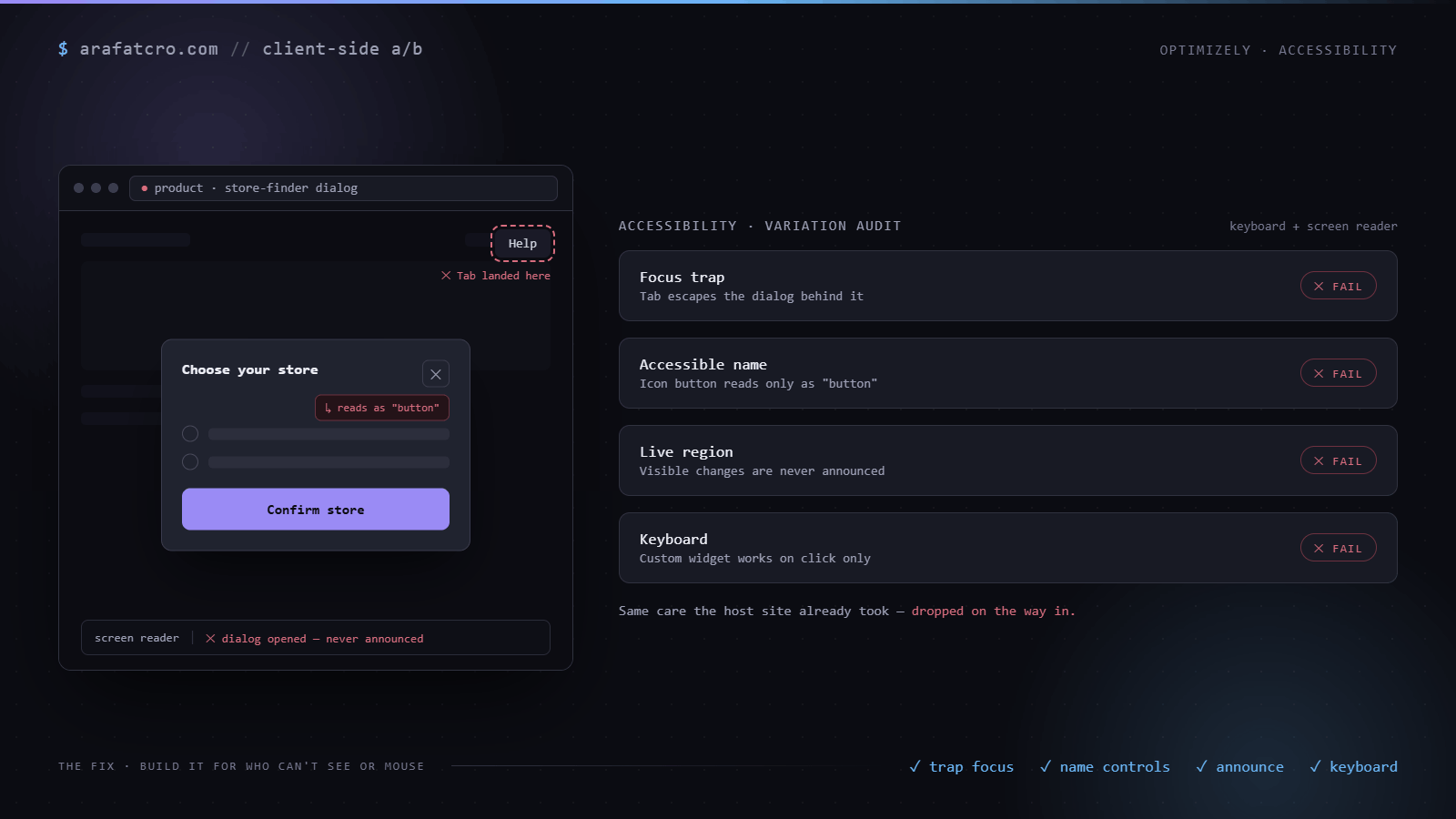
The symptom
The same failures repeat. Modals and overlays that do not trap focus, so Tab wanders off behind them. New controls with no accessible name. Changes that are obvious by sight, a count updating, an error appearing, that never get announced, so anyone not watching the pixels misses them. Custom widgets that work on click and ignore the keyboard entirely.
Why variations drop accessibility
The host site usually got this right. Your variation is bolted on after the fact, and it is easy to copy the visual design while quietly dropping the focus management, the ARIA, and the keyboard handling that made the original usable. Accessibility is invisible until someone cannot use the thing, and that someone rarely turns up in a quick QA pass on a fast laptop with a mouse.
The fix: focus, names, announcements, keyboard
Manage focus. When you open something, move focus into it, mark the rest of the page inert so Tab and a screen reader cannot wander out behind it, and keep focus looping until it closes. Then hand focus back to whatever the user was on. Give every control a name a screen reader can read, with real text or an aria-label. Announce changes that are only obvious by sight through a live region. And make it all work from the keyboard, not only the mouse. Here is the piece people skip most, trapping focus in a modal, which the WAI-ARIA dialog pattern spells out. None of this depends on the test tool, since Optimizely, VWO, Convert, and Adobe Target all just run your client side code.
// Trap one layer: inert siblings, loop visible Tab stops, Escape closes this layer, restore focus.
// Trap focus in one modal or drawer your variation opens, then return it.
function trapFocus(container) {
  const previouslyFocused = document.activeElement;
  container.setAttribute("tabindex", "-1"); // so .focus() works even with no children

  // Re-query each call: only visible stops, and never stale as content changes.
  const stops = () =>
    [...container.querySelectorAll(
      'a[href], button:not([disabled]), input:not([disabled]), select, textarea, [tabindex]:not([tabindex="-1"])'
    )].filter((el) => el.offsetParent !== null);

  // Inert the siblings of THIS layer. For a nested layer, inert relative to the
  // layer above it, not the body, or the gap between them stays reachable.
  const inerted = [...document.body.children].filter((el) => el !== container && !el.contains(container));
  inerted.forEach((el) => el.setAttribute("inert", ""));
  (stops()[0] || container).focus();

  const close = () => {
    container.removeEventListener("keydown", onKeydown);
    inerted.forEach((el) => el.removeAttribute("inert"));
    previouslyFocused?.focus();
  };

  // Listen on the container, not document, and stop the event there, so Escape
  // closes only this layer instead of collapsing the whole stack beneath it.
  const onKeydown = (e) => {
    if (e.key === "Escape") { e.stopPropagation(); return close(); }
    if (e.key !== "Tab") return;
    const items = stops();
    if (!items.length) return;
    const first = items[0];
    const last = items[items.length - 1];
    if (e.shiftKey && document.activeElement === first) { e.preventDefault(); last.focus(); }
    else if (!e.shiftKey && document.activeElement === last) { e.preventDefault(); first.focus(); }
  };
  container.addEventListener("keydown", onKeydown);

  return close;
}
That traps one layer. When you stack them, a drawer with a modal on top and a success modal after that, each new layer deactivates the trap beneath it and inerts relative to the layer above rather than the body, and Escape closes only the top. Get that wrong and focus either leaks into the layer underneath or a single Escape collapses the whole stack.
How this played out on a real build
On a Screwfix product page I replaced the stock check with a store finder, and accessibility was most of the work. It opened as a drawer, with a confirm step as a modal inside it, and a success modal after the item went into the basket. Three stacked layers, and every one is a chance to strand a keyboard user behind the thing that just opened.
Each layer trapped focus the same way: mark everything outside it inert so Tab and a screen reader cannot reach the page, move focus in on open, send it back to the trigger on close, and let Escape close the topmost layer first. Errors spoke through an alert role so they were heard, not just shown. The fiddly part was the nesting. Opening the modal had to release the drawer's trap so the two did not fight over focus, then put it back when the modal closed.
Accessibility checklist for a variation
| Variation change | Accessibility risk | What to add |
|---|---|---|
| A modal or overlay opens | Focus escapes behind it, so Tab and a screen reader wander into the page underneath | A focus trap, focus returned to the trigger on close, and Escape to close |
| An icon-only button or control | No accessible name, so it reads as just "button" | An aria-label or visible text, with the icon marked aria-hidden |
| Content swapped or inserted dynamically | The screen reader stays silent, so anyone not watching the pixels misses the change | An aria-live region (role="status" for updates, role="alert" for errors) |
| Content hidden visually | Still in the tab order, so a keyboard user tabs into something they cannot see | A real hide with hidden or display:none, or mark the container inert |
None of this depends on the test tool. Optimizely, VWO, Convert, and Adobe Target all run your client side code, so the fix is the same wherever the variation ships.
Common questions
How do I make an A/B test variant accessible?
Carry over the things the host site already did. Move focus into anything you open and trap it there, hand focus back when it closes, and let Escape close it. Give every control a name with real text or an aria-label. Announce changes that are only obvious by sight through an aria-live region. And make sure it all works from the keyboard, not just the mouse.
Why don't screen readers announce my variation's changes?
A screen reader reads the page once and then only speaks again when something tells it to. If your variation swaps text, updates a count, or shows an error by changing the DOM, none of that is announced unless it happens inside an aria-live region. Put the changing content in an element with aria-live="polite", or role="status" for updates and role="alert" for errors, and update its text.
How do I trap focus in a modal my A/B test opens?
On open, move focus into the modal and mark everything else inert so Tab and a screen reader cannot reach the page behind it. Loop Tab between the first and last focusable elements inside. Listen for Escape to close. On close, remove inert and send focus back to the element that opened the modal, so the keyboard user is not dumped at the top of the page.
Why does my icon button read as just "button" to a screen reader?
It has no accessible name. An icon-only button is an SVG or background image with no text, so a screen reader has nothing to read but the role. Add a name with an aria-label on the button, or include visually hidden text. If the icon is decorative, also mark the SVG aria-hidden so it is not announced twice.
Is hiding content with display:none enough to remove it from a variation?
If you hide with display:none or the hidden attribute, yes, it leaves the accessibility tree and the tab order. The trap is hiding visually only, with opacity:0 or by moving it off screen, which leaves it focusable so a keyboard user tabs into something they cannot see. Either truly hide it, or mark its container inert so it cannot take focus.
The short version
Build the variation for the person who cannot see it or cannot use a mouse. Trap focus in what you open, name every control, announce what changes, and make it all work from the keyboard. It is the same care the host site already took. Just do not drop it on the way in.